Guide
Instagram DM automation for agencies: a playbook
When you sell comment-to-DM automation as a service, the keyword is the easy part. The hard parts are the scope, the client approval, the shared allowance, the switch from an old tool and the demo you show a prospect. This playbook condenses each into one checklist you can use on your next client.
Published by ReplyMagnet · Last updated
How to scope an Instagram automation service for a client
Sell a defined deliverable: one request, its paths, the approved resource and a testable completion standard. A tool connection is an input to the service, and lead or follower numbers should never be the acceptance test.
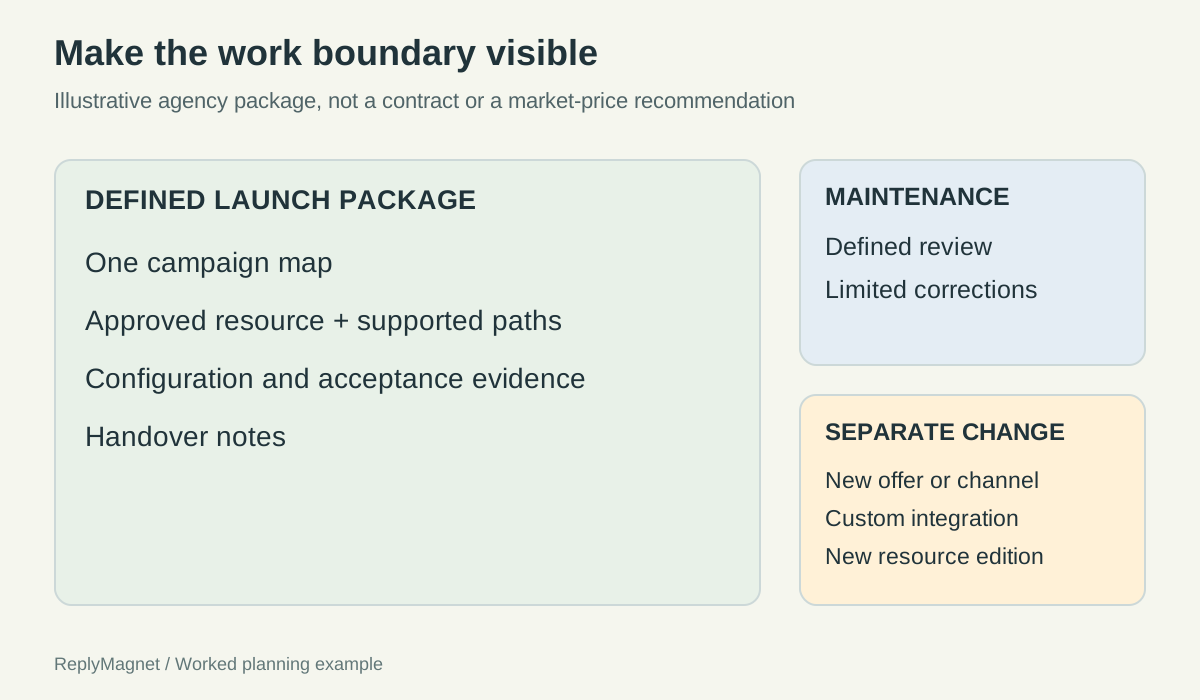
Original scope diagram for an illustrative agency package. Agree real commercial terms separately.
Start from the client's task. "Deliver the preparation guide to people who ask under the launch post" tells you what to build and tells the client what to expect. "Build a chatbot" does neither. Want to try the workflow on your own account first? Start free and build one campaign before you price anything.
Split the launch package from the operating service. Launch work creates and verifies one campaign. Maintenance keeps agreed parts current. Neither should quietly grow into unlimited campaigns or answering every DM for the client.
Estimate effort from the real tasks, including communication and testing. In an invented example, discovery takes 1.5 hours, copy and mapping 1.5, configuration 2, testing 2, one revision round 1.5 and handover 1.5, so 10 hours in total. Replace every figure with your own records.
List the client inputs with an owner and a due date: account authorization, the final resource, verified offer facts, a working destination and the person who receives enquiries. Running several client profiles? The multiple accounts guide covers account slots and shared usage, and the social media manager page covers day-to-day client work. If you also recommend the tool to clients, the referral programme guide explains how to join and disclose commission.
Illustrative division between launch, maintenance and new scope
Launch deliverable
Map one request and its paths
- Recurring item if agreed
- Review the map when facts change
- Separate change to scope
- Add a new offer or journey
Launch deliverable
Configure approved messages
- Recurring item if agreed
- Correct copy within an agreed limit
- Separate change to scope
- Write a new campaign sequence
Launch deliverable
Attach the approved resource
- Recurring item if agreed
- Check its destination still works
- Separate change to scope
- Create a new resource or edition
Launch deliverable
Record acceptance tests
- Recurring item if agreed
- Repeat agreed checks after small updates
- Separate change to scope
- Build new integration tests
Launch deliverable
Provide handover notes
- Recurring item if agreed
- Keep owner details current
- Separate change to scope
- Train a new team
Make “approved” mean the whole customer journey
Client approval should cover the caption, the opening DM, every branch, the named resource version and each destination together. A thumbs-up on the caption alone leaves the rest of the customer journey unapproved.
Build a short review pack in reading order: the post draft, the opening DM, each next step, the resource filename or version date, and the destination URL. Ask the reviewer to follow each route as a customer would. "Does this look good?" invites opinions about colours and misses wrong promises. Keep API keys, contact exports and real conversations out of the pack, and run the security checklist before you give a client any access.
Name one accountable approver for the offer and use a readable version label, such as "North Street beginner guide, review 03". Record each decision as one of three states:
- Accepted: no open conditions, with the version and date recorded.
- Changes required: each change listed with an owner.
- Accepted with conditions: not final until someone shows the conditions closed.
A specialist check, such as a teacher confirming session content, is useful but is not overall approval. Keep two status lines before publishing: content accepted and implementation checked. A client can approve the wording while the setup still needs testing.
A late change to a price, date, resource or destination reopens review for the affected route only. In ReplyMagnet, replacing an asset changes future deliveries but does not rewrite links already sent, so decide whether earlier recipients need a correction.
How to plan Instagram automation capacity across client campaigns
Forecast in the unit your plan counts. ReplyMagnet's billing documentation counts a matched comment's public reply and DM as 1 engagement, and every campaign in a workspace draws on the same allowance.
Followers, raw comments and billable engagements are different quantities. Copy the remaining allowance and reset date from the workspace you will actually use, not from a remembered pricing table. Then build low, central and high cases for every campaign sharing that allowance. The figures below are hypothetical.
Compare each total with the real remaining allowance. If the central case nearly uses it, act before the next promotion post goes out. Over-limit work waits as pending instead of sending, and a request that waits too long can pass its messaging window before it is released.
Name owners for usage checks, the resource, customer exceptions and the decision to pause a promotion. Write the trigger in advance, for example: if observed demand makes the remaining allowance insufficient, the promotion owner reviews the next scheduled post before it goes out. After the period, record actual usage beside each forecast and note why they differed.
Synthetic demand scenarios for one planning period, in engagements
Comment campaign
New workshop guide
- Low
- 120
- Central
- 300
- High
- 650
Comment campaign
Partner resource promotion
- Low
- 80
- Central
- 160
- High
- 300
Comment campaign
Existing evergreen checklist
- Low
- 50
- Central
- 90
- High
- 180
Comment campaign
Combined planned demand
- Low
- 250
- Central
- 550
- High
- 1,130
How to migrate a client from another Instagram automation tool
Move the campaign's behavior, not just its keyword: map the trigger, copy, resource, capture fields, destinations and owner first. Rebuild one low-risk campaign, cut over in a planned window and keep a rollback condition ready.
Write a tool-independent map of the existing campaign before rebuilding. Similar-looking settings in two products may not behave the same, so mark anything the new tool does not support as a decision, not a silent drop. Contacts, tags and conversation history do not move just because both tools connect to Instagram.
Then work through the switch in order:
- Preserve the old configuration and your notes.
- Rebuild one simple, single-resource campaign as a draft.
- Confirm which connected app is responsible for answering, so two tools never race on the same comment.
- Switch off the old overlapping trigger at the agreed time.
- Test from an account you control, plus one unrelated comment that should stay out of scope.
- Restore the old setup if the wrong resource arrives, replies duplicate or captured details reach the wrong destination.
After acceptance, check older posts whose captions still invite the old request. Links the old tool already sent stay with the old tool, so decide what happens to them before that subscription ends.
How to choose an Instagram automation tool with a scorecard
Score each tool against 3 jobs your client needs done, not against feature lists. Treat account connection and the delivery route as pass-or-fail gates, weight the useful extras, and fill every score from a trial result.
Write the jobs first, for example: deliver a requested checklist, route a relevant question to an answer, and let the owner maintain the setup without the original freelancer. Then classify each requirement as a gate, a weighted tradeoff or out of scope.
With ratings of 3, 2 and 1 on the weights below, an invented candidate scores 3×3 + 2×2 + 1×1 = 14. Mark untested items as not verified rather than 0 or full marks, and never fill a result from a sales page. Run the same acceptance task in every trial, performed by the person who will operate the tool.
Compare limits in each vendor's own unit. A contact-based allowance counts something different from an engagement, as this free-plan limit breakdown shows. If a client wants a custom build instead, the n8n versus managed tools guide maps the hosting and maintenance work you would then own.
Fictional scorecard design. Ratings stay empty until a trial produces evidence.
Requirement
Supported account connection
- Treatment
- Essential gate
- Weight
- Not scored
- Evidence needed
- Actual account and plan support
Requirement
Requested delivery route
- Treatment
- Essential gate
- Weight
- Not scored
- Evidence needed
- Controlled delivery test
Requirement
Maintainability
- Treatment
- Useful tradeoff
- Weight
- 3
- Evidence needed
- Owner edits the intended content
Requirement
Operational feedback
- Treatment
- Useful tradeoff
- Weight
- 2
- Evidence needed
- Owner explains a controlled exception
Requirement
Export fit
- Treatment
- Useful tradeoff
- Weight
- 1
- Evidence needed
- Required fields can be retrieved
How to demo Instagram automation without real customer data
Demo one bounded capability with authorized demo accounts, fictional resources and a clean screen. Label an editor preview as a preview and a live run as a controlled test, because each proves something different.
Write the learning objective first, for example: "The viewer can see that a WORKBOOK comment returns the workbook link." Then prepare the data as carefully as the script:
- Comment from a separate test account, because ReplyMagnet ignores comments from the connected account itself.
- Give demo resources titles that match what the DM promises.
- Close unrelated tabs and silence notifications before recording.
- Keep credentials, client inboxes, emails and private messages out of the shot.
- Say when footage is shortened or reordered.
Read every overlay as a claim. Words like delivered, booked and subscribed need evidence that the recording actually shows. A headline such as "comment to customer in seconds" promises an outcome no demo can establish. For the build itself, follow the comment-to-DM setup guide and record a real test from the second account.
Keep a short production note with the recording date, the mode shown and the demo data used. Recheck the video when the product or the workflow changes.
Common questions
What should an Instagram automation agency package include?
A defined launch package: one campaign map, approved copy, the client's resource, configuration, test evidence and handover notes. Price maintenance and new offers separately.
Who should approve a client's Instagram automation?
One named person accountable for the offer, usually the business owner. Specialists can check facts, but only the accountable approver closes the decision for a specific version.
Does ReplyMagnet count a public reply and a DM separately?
No. ReplyMagnet's billing documentation counts a matched comment's public reply and DM as 1 engagement, drawn from the allowance every campaign in the workspace shares.
Can I import campaigns from another automation tool?
Plan to rebuild rather than import. Map each campaign's trigger, copy, resource and destinations, rebuild one low-risk campaign, then cut over with a rollback plan.
Can I demo comment automation on my own post?
Comment from a second account. ReplyMagnet ignores comments from the connected account itself, so a comment from your own profile will not trigger the workflow.
Keep reading
- Guides
- Instagram Comment-to-DM Automation: Setup & Test Guide
- Instagram automation for social media managers