Guides
Instagram DM Automation vs Website Live Chat: Where Should the Conversation Start?

Instagram DM automation helps respond to a supported request made on Instagram. Website live chat helps a visitor who is already on your site. Choose by the customer’s current task, then decide how automation and people will share responsibility in that channel.
Published by ReplyMagnet · Last updated
A social post may create a new question; a product page may leave one final detail unanswered. Both can lead to a conversation, but they begin with different context. This guide compares those situations without assuming that every website chat is human-only or that every DM should be automated.
Start with where the customer is
A person asking under an Instagram post needs a route from social content to the next useful answer. A website visitor may already be comparing a product, reading a policy or attempting a purchase.
Imagine a fictional outdoor-equipment shop. On Instagram, a short video shows how to pack a day bag. Someone requests the packing checklist. On the website, another visitor is looking at a specific bag and wants to know whether a bottle fits its side pocket. The questions may concern the same product, but they do not start at the same point.
The Instagram request can be completed by delivering the promised resource through an eligible campaign. The website question may be easier to resolve while the person remains on the product page, with the relevant dimensions close at hand. Moving that visitor into a different app could add an unnecessary step.
Avoid deciding that one channel is always more personal or more efficient. Those qualities depend on the actual response, information and staffing. A useful automated answer can be clearer than a rushed human reply; a human may be necessary when the question requires judgment or access to private account information.
Write the task first: “Get the packing checklist” or “Confirm whether this bottle fits.” The channel choice should make that task easier to complete, not simply increase the number of conversations in a dashboard.
What each channel can reasonably own
Use Instagram for its supported social requests and website chat for questions arising during a site visit. A channel can host automated or human responses, but its actual capabilities depend on the chosen product and configuration.
Shopify Inbox is one documented example of website conversation tooling. Shopify describes it as connecting with online-store visitors and includes an optional automated agent. That is a useful correction to the idea that “live chat” always means a person is typing every answer.
Instagram DM tools also vary. Some focus on requested links; others offer more conversation controls. Do not assume a capability is available in every tool or on every plan because it appears in a category description. Check the actual customer task and current product scope.
ReplyMagnet supports eligible Instagram resource-request workflows. This article does not establish that it provides a website chat widget, a shared cross-channel inbox or automatic identity matching with a store visitor. If you use a separate website-chat service, that remains another system with its own setup and owner.
The practical question is where to resolve the request with the least unnecessary movement. A visitor who has already found the right product page should not have to comment on a Reel to get an ordinary product fact. A person asking for the Reel's resource should receive the resource before being invited into another support journey.
Compare the context without assuming hidden knowledge
Use only the context the system actually provides. A website-chat session may offer page or customer information, but a DM account and a store session should not be treated as the same verified person by default.
The outdoor shop can know which resource its Instagram campaign promises because the campaign was configured around that offer. It should not infer the person's purchase history, preferred size or location unless those facts are actually available and appropriate to use.
A website-chat product may provide information about the visitor's current session or store activity. Verify the documented behavior rather than writing “we can see your cart” into a script automatically. The visitor might be browsing anonymously, using another device or returning through a different session.
For sensitive tasks, context is not a substitute for verification. A person mentioning an order in a chat should use the business's approved support process before private order information is disclosed. A similar display name in Instagram and a customer record does not establish identity.
Keep a short distinction in the operator guide: known from the current interaction, supplied by the customer, inferred but unconfirmed, and unavailable. That vocabulary reduces confident but inaccurate replies. It also makes handoffs easier because the next person can see which details still need to be established.
Context review for the fictional bag enquiry
Observation
Requested the packing checklist
- Safe interpretation
- Interested in that resource
Observation
Asked about a bottle pocket
- Safe interpretation
- Needs a product-fit answer
Observation
Mentions a previous purchase
- Safe interpretation
- A claim to verify if private records are needed
Observation
Opened a tagged resource link
- Safe interpretation
- Link activity, not a verified customer identity
Observation
Appears in another channel
- Safe interpretation
- Separate interaction until properly associated
Work through one product question in both routes
Compare the complete path to a useful answer. The same product question may need a resource in Instagram and a short clarification on the website.
For the Instagram post, the shop might say: “Comment PACK for the day-bag checklist.” The first DM names the resource and explains the link. A later question about bottle fit can be answered with the product's published measurements or directed to a person if those measurements are insufficient.
For the website visitor, the chat response can point to the exact dimension or ask which bottle measurement they need to compare. It should avoid restarting the whole discovery process. A visitor already looking at a product does not need a long welcome sequence that hides the answer they came for.
These are fictional response designs, not measured customer outcomes. Test them with a willing participant who has the actual question. Ask the person to explain what they understood and what they would do next. A polite “thanks” is not the same as evidence that the fit question was resolved.
If the answer is repeatedly needed in either channel, improve the product page or public resource. Conversations can reveal missing information, but the solution is not always another automated response. A clearly published measurement may help the next visitor before they need to ask.
Design the handoff only when it adds value
A handoff should move the request to a better source of help, not merely to another inbox. Explain the reason, the next owner and what context the customer will need to provide.
The shop might direct an Instagram visitor to a product page because it contains current options and availability. If the person then needs help, the website's support route can take over. Make that sequence explicit without claiming the conversation history will travel automatically.
A short handoff could say: “The product page has the current measurements and available options. If your bottle still looks borderline, use the shop's support chat and mention the bag model so the team can check.” Use this only if the site actually offers that support and the team can perform the check.
Avoid a loop in which the Instagram response points to site chat and site chat tells every visitor to send an Instagram DM. Draw the route and assign a final owner for exceptions. The human-handoff guide helps define that responsibility.
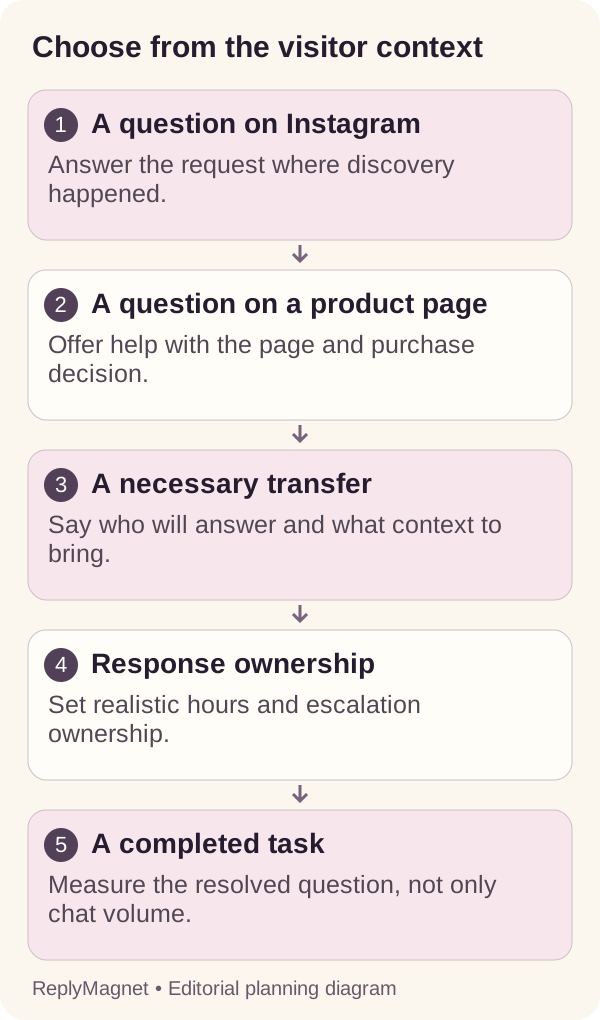
Channel decision diagram: context determines the starting route; a supported answer or an owned escalation determines completion.
Set staffing and offline expectations
Both channels need an owner for exceptions and unanswered requests. Explain availability honestly, even when automation can provide an initial response outside staffed hours.
An immediate acknowledgement can be helpful, but it is not a resolved enquiry. If the automated response cannot answer the bottle-fit question, the customer needs to know when the shop's team can check. Avoid wording that suggests a person is present when the channel is unattended. For manual answers inside Instagram, compare saved replies with DM automation.
Shopify's conversation-management guidance describes its own handling of visitors who leave the store and the associated email continuation. Treat this as product-specific behavior to verify, not a promise that every site-chat system will continue in the same way.
For your own process, define who checks unresolved questions, how they notice a new request and what happens during closures. A small business can choose limited coverage as long as the expectation is accurate and the fallback is usable. The response-standard guide explains how to set a target from actual capacity.
Review the first message in both channels as a customer would. Does it say what can happen now? Does it explain what requires a person? Is there a working alternative for a time-sensitive problem? These details matter more than whether the interface displays a chat bubble or an Instagram icon.
Measure resolution separately from activity
Record whether the customer received a useful answer or completed the intended next step. Message counts, chat sessions and link clicks describe activity; none automatically proves a resolved question or purchase.
For the fictional shop, a review sheet can record the question, starting channel, last confirmed step and outcome. “Packing checklist opened” and “bottle fit confirmed” are different outcomes. Keep them separate so the resource campaign is not credited with every later product decision.
Some outcomes will remain unknown. A visitor may leave after reading an answer, buy later on another device or choose another product without telling the team. Do not classify all silence as satisfaction or failure. Note what the available record can actually support.
Use UTM tracking where useful for destination links, but keep its scope clear. A tagged visit can help identify a route; it does not automatically connect a website-chat session to an Instagram identity. Avoid presenting separate systems' totals as one perfectly matched funnel.
Read a small selection of questions for patterns. If both channels receive the same misunderstanding, fix the public product information. If only one route creates confusion, inspect its first response or destination. The next action should follow the observed problem rather than a preference for the channel with the larger activity count.
Choose a minimal combination and test it
Start with the channel that matches the immediate customer task. Add a second channel when it solves a real gap and your team can maintain the boundary between them.
The shop's minimum useful setup could be one Instagram campaign delivering the packing checklist and a clear website support route for product-specific questions. It does not necessarily need a complex conversation in both places. The right amount of automation depends on the questions, information and staffing available.
Before expanding, run three acceptance tasks: a social visitor requests the resource, a website visitor asks a product question, and an exception reaches a responsible person. Use example data and controlled participants. Record what happened rather than marking a task passed because the settings looked correct.
Test the maintenance work too. Change a resource link or update a product fact and check where the correction must appear. If the same answer is stored in several systems, assign an owner to keep those copies aligned. The resource-library audit offers a method for tracking such dependencies.
Choose the arrangement your team can explain to a new colleague: where requests begin, which system answers, where the current information lives and who takes over when the answer is insufficient. That clarity is a stronger foundation than simply putting a chat option everywhere.
Common questions
Is website live chat always answered by a person?
No. Products can combine automated agents, instant answers and human responses. Check the actual implementation and make the customer’s next step clear.
Does ReplyMagnet include website live chat?
This guide does not claim a ReplyMagnet website chat widget. It compares supported Instagram resource requests with a separately operated website conversation service.
Which channel converts better?
There is no universal result established here. Compare the same defined customer outcomes in your own context and preserve attribution limits and unknowns.
Keep reading
- Instagram DM conversation design: a practical guide
- Instagram call to action: DM, comment or link?
- Instagram DM Automation vs Email Marketing: When to Use Each
- Create a ReplyMagnet campaign: posts, triggers and delivery
- ReplyMagnet assets: upload a PDF or add a link