Guides
Send Shopify Product Links Through Instagram DMs

Make the DM a clear route to the product shown in your post. Use the current Shopify page for options, availability and checkout, and test the exact path a reader receives before promoting it.
Published by ReplyMagnet · Last updated
Give the Instagram request a specific store destination
Send the shopper to the Shopify product page that answers the post, with enough context to recognize the item. The store should handle current options, availability and checkout.
Someone watching a Reel about a small travel bag should not need to search an entire store to identify it. A useful DM names the product and explains what to inspect at the destination. The link completes the handoff from the item shown on Instagram to the information needed before buying.
This is an external-link workflow. ReplyMagnet can deliver a configured URL asset on Basic or above. It is not being described as a native Shopify connector, synchronized product catalogue, inventory service or payment interface. A store URL in a message does not create any of those capabilities.
Begin with the question the post invites. “Where can I see the dimensions?” calls for a product page with measurements. “Which of these two bags suits a laptop?” may need a comparison before a product link. Sending every question straight to checkout can skip the information the person actually needs.
Shopify’s product-details documentation explains how product information affects what customers see, with variant details handled separately where applicable. Use the maintained store page as the source for purchase facts rather than copying a temporary price or stock claim into a long-lived DM.
Choose between a product page, collection and comparison
Use a product page for a clearly identified item. Use a collection or comparison only when the post genuinely asks the shopper to explore or choose among several options.
Match the destination to the specificity of the invitation. A Reel demonstrating the pockets on one named bag should usually lead to that bag. A post introducing a seasonal range may reasonably lead to its collection. The problem is not that collection pages are bad; it is sending someone to browse when you promised the exact item.
Write the destination’s job in one sentence: “This page lets the reader inspect the compact bag’s measurements and available options.” Then open the page on a phone and see whether it does that without another search. The first visible product image, name and option controls should help confirm the match.
For a comparison request, prepare a resource that explains meaningful differences. The product comparison guide shows how to choose fair criteria. For a small guided choice, the product finder guide covers routing stated needs to appropriate information. Neither approach should pretend to know live availability unless a verified system provides it.
Keep variant and stock promises in Shopify
A link can open a product page or a tested option-specific destination, but it does not reserve stock. Verify the selected option on arrival and leave current availability with the store.
Colour, size, material and other options can affect what the shopper receives. A photograph may show one option while the store initially selects another. If the DM says “Here is the small olive bag,” the arrival state needs to make that item easy to recognize, even when the buyer must select the options themselves.
Use a shareable destination produced or supported by your store and verify its behavior. Do not assume a manually edited URL parameter will select the desired variant across every theme or store change. If a reliable option-specific link is not available, use the product page and explicitly say which choices to inspect.
A selected option is still not a reservation. Avoid “I have saved one for you” or “your size is guaranteed” when the workflow has only sent a link. The product page and checkout remain responsible for the current purchase state.
Treat stored message copy as durable. “The small olive version shown in the Reel” is a descriptive reference that can remain useful. “Only two left right now” becomes stale quickly unless a separately verified process keeps it accurate. This workflow provides no inventory synchronization.
When testing, change the option after arrival and inspect the item that reaches the cart. A correct opening image is not enough if the cart contains a different size. Record both states in the acceptance sheet.
Prepare one post-to-product campaign
Connect the intended post, an explicit request and the tested external asset. Keep the DM focused on the product information the reader asked to receive.
Start with one professional Instagram account, one post or Reel and one product destination. Follow the campaign setup documentation to select the supported scope and trigger. Keep the first campaign narrow enough that an unexpected response can be traced to a specific rule. For a promotion, see delivering discount codes by DM; for a marketplace shop, see promoting Etsy listings by DM.
For the fictional travel bag, the caption could say: “This is the compact bag shown in today’s packing demo. Comment BAG for the product page with measurements and available colours.” The wording names both the item and the job of the destination. It does not promise that every colour is currently in stock.
The DM might read: “Here is the compact bag from the Reel. Check the dimensions and choose your colour on the store page before ordering.” Attach the approved external destination through the asset configuration. URL assets require Basic or above; keep that requirement in your plan for the campaign.
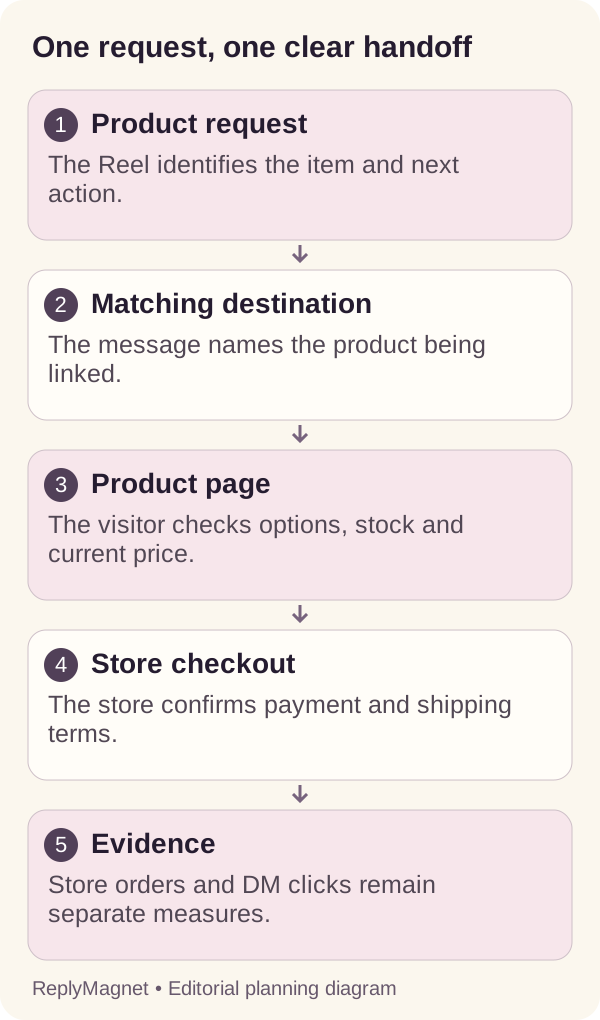
Original handoff diagram. The store owns product selection and purchase; the messaging route does not synchronize stock or take payment.
An email form usually adds an unnecessary step if the entire promise is a public product page. If you need additional information for a separate purpose, explain that purpose and assess whether it belongs in this request at all.
Work through a bag with two sizes and two colours
Record the exact item shown, the expected landing state and the choice the shopper still needs to make. A useful product-link test follows the selection through to the cart.
This example uses a fictional bag offered in compact and large sizes, with olive and charcoal colours. The Reel shows a compact olive bag. No dimensions, prices or stock levels in this example represent a real store. The purpose is to make option mismatches visible before a campaign launches.
The team chooses the ordinary product page because its tested mobile layout explains both sizes clearly. The message names the compact bag and asks the shopper to compare the listed dimensions. On arrival, the tester checks whether the shown image and option labels make that request understandable.
Suppose the page defaults to the large charcoal option. That need not make the page unusable, but the team must not describe the URL as a direct selection of the compact olive option. They can use a verified option-specific link, improve the message to explain the selection, or revise the page experience. The decision should come from a test, not a guess.
The tester then selects compact and olive, adds the item to the cart and checks the line item before payment. If the cart displays large or charcoal, the handoff has failed despite the correct product name.
Keep the sheet below with the campaign. Include an actual observation and date for each row. Blank cells are unfinished tests, not assumed passes.
Fictional bag product-link acceptance sheet
Check
Requested item
- Expected evidence
- Compact bag shown in the Reel
- If it differs
- Correct the caption or destination
Check
Arrival state
- Expected evidence
- Recognizable product and visible option controls
- If it differs
- Explain selection or use a tested option link
Check
Selected variant
- Expected evidence
- Compact size and chosen colour
- If it differs
- Inspect URL, theme and selection behavior
Check
Availability
- Expected evidence
- Store states current availability
- If it differs
- Remove unsupported DM promises
Check
Price and shipping
- Expected evidence
- Current purchase information visible at store
- If it differs
- Repair missing or misleading page information
Check
Cart line
- Expected evidence
- Chosen size and colour carried forward
- If it differs
- Investigate before promoting the link
Test on a phone outside the store-owner session
Open the actual delivered link as a visitor, inspect the product and options, and follow the route to the cart. Owner access can hide barriers that a prospective shopper encounters.
Start with the direct product URL in a signed-out or private browser. Confirm that it is a public storefront page rather than an admin link, preview with special access or password-protected destination. If the store is intentionally not yet public, make that part of the launch plan instead of promoting a route readers cannot use.
Next, test the full received path from an authorized controlled Instagram request. Check the destination after all delivery redirects, on the device readers are likely to use. A URL that works when pasted into a desktop browser may behave differently in the actual phone route.
Read the page rather than only checking that it loads. Can a visitor identify the item, choose the option, understand essential measurements and find delivery information? Do overlays, region selectors or sign-in prompts prevent the intended task? Record the exact obstacle and which service displays it.
The resource sign-in troubleshooting guide helps separate delivery-layer problems from restrictions at the destination. A successful ReplyMagnet delivery does not grant access to a private storefront or sign the visitor into Shopify.
Complete the option and cart checks without making an unintended purchase. If purchase testing is required, use the store’s authorized test process. Store-owner familiarity should never be the only evidence that a first-time visitor can follow the route.
Plan for unavailable products and changed URLs
Keep a current destination and an owner for reviewing the campaign. When the item changes or disappears, correct the invitation and provide an honest next step.
Products can sell out, be replaced, move to another URL or stop shipping to a region. A campaign connected to an old post can remain discoverable after any of those changes. Add destination maintenance to the product update process rather than waiting for a shopper to report a dead end.
If the item is temporarily unavailable, the store page may still be useful if it clearly explains the situation. Avoid adding an unsupported restock date to the DM. If an alternative is available, identify it as an alternative and explain the relevant difference instead of silently sending the reader to a substitute.
When changing URLs, inspect the whole delivered path again. A redirect can preserve access, but it can also lead to a generic collection or lose an intended option. Check the product, variant controls and cart behavior after the change. Do not treat an HTTP response as proof of a satisfactory shopping journey.
Record the campaign, post, current destination, product owner and last review date in a small link register. Ask the store owner to flag catalogue changes that affect active promotions. A short register tied to the actual product workflow is more sustainable than a separate spreadsheet nobody maintains.
If the promise can no longer be fulfilled, pause or correct the promotion. Previously sent messages may remain, so preserve a useful explanation at the destination where possible.
Measure visits and orders with their own evidence
Use messaging records for the request and delivery, store analytics for visits, and Shopify order records for purchases. Link delivery does not establish an order or its cause.
Begin with an operational question: did people asking for the product receive a usable route? Review the request, message and delivery-link activity using the product’s actual reporting definitions. Then inspect store-side evidence for product-page visits and completed purchases where available.
Avoid naming every delivery-link open a product view or every product visit a buyer. The visitor may abandon before the storefront loads, revisit several times, choose a different item or purchase later through another route. Forwarded links can also carry the original campaign context to someone else.
For a weekly review, compare three things: whether the route worked, which product questions remained unresolved and what the store actually recorded. Repeated questions about size may justify better measurements or a comparison resource rather than another promotional message.
ReplyMagnet is not verifying Shopify purchases in this workflow. Keep order support with the store’s order record and its support process. The strongest next improvement is often precise and small: a clearer option label, a more accurate caption or a destination that answers the question the Reel created.
Keep reading
- Instagram DM conversation design: a practical guide
- Create a Product Comparison Guide for Instagram Shoppers
- Why your Instagram resource link asks visitors to sign in