Guide
What to do after someone downloads your Instagram lead magnet
Delivery is the halfway point. After someone downloads your Instagram lead magnet, they still need to start using it, recognize your first email, and get follow-up that matches what they asked for. This guide covers each of those jobs, plus buyers of paid products and people registering for events.
Published by ReplyMagnet · Last updated
What should happen after an Instagram lead magnet download?
After an Instagram lead magnet download, the reader should complete one useful first task, then receive only the follow-up they asked for. Delivery, use, email signup and purchase are separate states, so plan and measure each one on its own.
A comment-to-DM campaign gets the resource into someone’s hands. The comment-to-DM setup guide covers that part, and the lead magnet delivery guide covers the file, the DM and optional email capture. Everything below starts one step later.
Use this list to decide which section you need:
- The reader has the file but does nothing with it: fix the first page of the resource.
- They gave an email address: write a first email that fulfills the signup promise.
- You run several offers: label leads by the offer they requested.
- They bought a paid product: route access questions to the store, not the DM.
- They asked about an event: separate interest, registration and confirmation.
If you have not built the request step yet, start free with a 30-day trial and no credit card, then come back once your first campaign delivers.
How to help readers use a lead magnet after downloading it
Define one observable first action, put it on the opening page, and say when the reader can stop. Opening a file or receiving a link does not show that someone began using the resource.
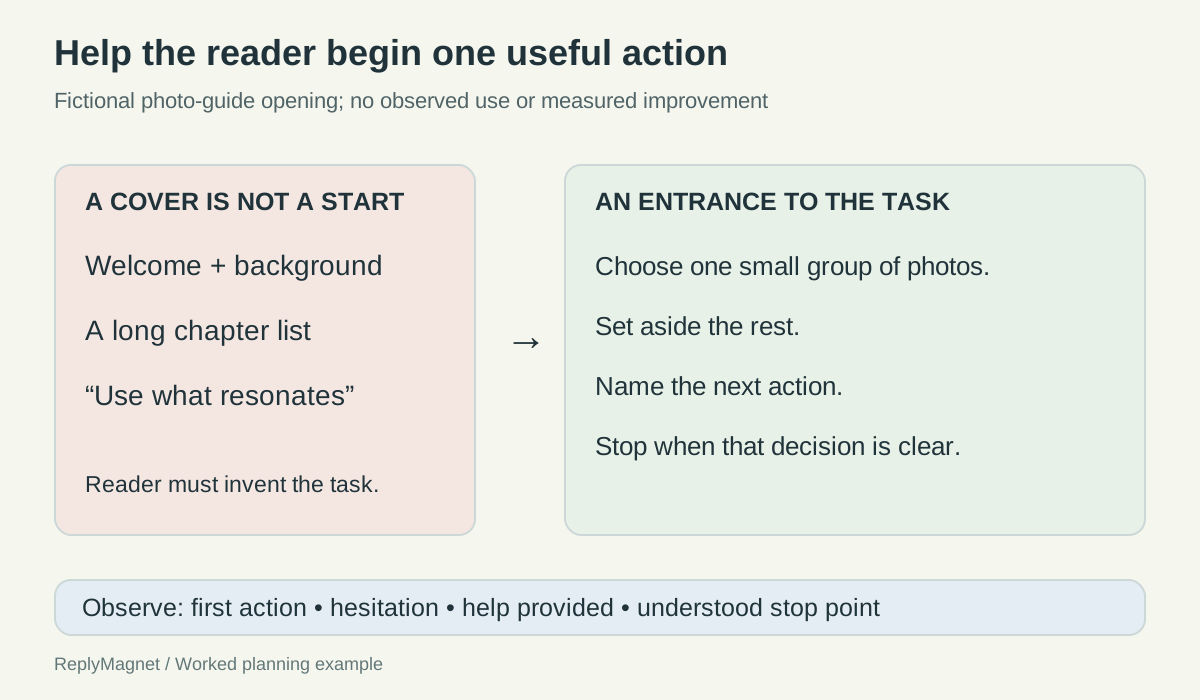
Many resources open with the creator’s story and a chapter list. None of that is wrong, but it delays the task the post promised. Write the first action as something you could watch someone do, such as “picks one small group of photos and names the next step.”
Rewrite the opening page with this checklist:
- Small task first: “Start with one envelope of photos. Leave the rest for later.”
- Inputs named up front: list anything the reader needs before they begin.
- A worked example: label it “Illustrative example” so nobody copies it as fact.
- A stop point: “You are done when you can name the group and your next action.”
- A help route: say what the contact link is for and who answers it.
Keep optional feedback optional. Never hide the next instruction behind a signup, a review or a share. If readers report a login screen instead of the file, work through the resource link sign-in fixes before you edit the content.
To test the page, hand it to someone who has not seen it and ask them to begin. Do not explain anything. Note where they pause, what help you gave and what they believed counted as finishing. Then make the smallest change that removes the obstacle.
What to put in the first email after an Instagram signup
The first email after an Instagram signup should come from a recognizable sender, say why it arrived, deliver the promised item and state how often you will write. Introduce no new offer until that promise is met.
Paste the exact Instagram invitation and form wording beside your draft. If the post says weekly and the form says monthly, fix the mismatch before you write. A reader who only requested a download has not necessarily joined a newsletter.
Confirmation and welcome are different jobs. A double opt-in message asks the person to confirm. The welcome arrives after that and delivers the publication. ReplyMagnet’s Mailchimp sync adds new contacts as subscribed, so a Mailchimp form setting will not add a confirmation step to that route. ReplyMagnet passes the contact; your email provider sends the email.
A short welcome that works:
- Subject: Your starter sketchbook exercise
- Opening: You joined the weekly Sketchbook Note through our Instagram signup.
- Value: one descriptive link, “Open the starter exercise”, plus one small first step.
- Expectation: one practical prompt each week, and you will say so if that changes.
- Footer: your provider’s real unsubscribe and subscription controls.
Test with 2 addresses you control: one new and one already on your list. Check the contact state, which messages fired and the delivered email on a phone. A sync notice alone proves nothing.
Promise check for a first email after an Instagram signup.
Email element
Sender
- Must match
- The named writer or publication
- Check
- Would the reader recognize it?
Email element
Subject
- Must match
- The promised resource
- Check
- Does the main link deliver it?
Email element
Frequency
- Must match
- The schedule stated at signup
- Check
- Does the provider sequence agree?
Email element
Help
- Must match
- A route someone monitors
- Check
- Can a reader report a broken link?
Email element
Controls
- Must match
- The provider’s subscription tools
- Check
- Do they work in a delivered test?
How to segment email leads by the lead magnet they requested
Segment Instagram email leads with 4 separate facts: source, the offer requested, the verified customer relationship and the provider’s subscription status. One “Instagram lead” label cannot tell you which follow-up fits.
Create a label only when it drives a real decision, such as which resource to send next. “Warm” means nothing without a rule. “Requested beginner exercise” describes an event another person can check.
Know what your connection actually sends. ReplyMagnet’s sync adds a Magnet label and, if enabled, a campaign-name label. In Mailchimp these arrive as tags, applied in a separate step from creating the contact, so check the record. In Kit they land in a custom field called magnet_tags, not as native Kit tags. A rule that expects a native tag will miss them.
If you need richer fields in another tool, send each lead through Zapier or Make with webhooks. For older batches, the CSV import runbook shows how to update existing contacts without duplicating them.
When someone requests a second offer, add the new interest without erasing the first. A returning address may update an existing contact rather than create a new person. Before sending to a segment, open a few records that should be included and a few that should not. If you cannot explain why someone is selected, simplify the rule.
A small label dictionary for leads from Instagram lead magnets.
Category
Source
- Example label
- source: instagram
- What it does not prove
- Interest or permission
Category
Interest
- Example label
- interest: beginner-exercise
- What it does not prove
- A purchase
Category
Interest
- Example label
- interest: service-guide
- What it does not prove
- An accepted project
Category
Lifecycle
- Example label
- lifecycle: customer
- What it does not prove
- Permission for every newsletter
Category
Subscription
- Example label
- Provider-managed status
- What it does not prove
- The signup promise; read both
How to onboard digital product buyers who come from Instagram
Name the free sample and the paid product differently, send buyers to the store’s access route, and open the product with one first task. A DM saying “I bought this” is a support request, not proof of payment.
Buyers often return to the Instagram DM where they first found you. Their need has changed: they want the right file, the right version and a place to begin. Call the files “Illustration workbook sample” and “Complete illustration workbook”, never two copies of “Your creative toolkit”.
Keep purchase checks with the store. ReplyMagnet is not a payment or license system, so an automated reply must never say a payment is confirmed. Never ask for passwords, card numbers or login codes in a DM, and never post a public paid-download link to fix one person’s problem.
A reply for a missing access link: “For the full workbook, use the help route on your purchase confirmation so the team can check your order.” If the buyer wants to keep talking somewhere more personal, offer a voluntary handoff from Instagram DM to WhatsApp with the context attached.
State what support covers. Help with access and files is not the same as personal critique. When the same question repeats, fix the product page or file name instead of writing more replies.
Routing buyer questions that arrive by Instagram DM.
Reported problem
Missing access link
- What to say
- Use the official store help route
- Who resolves it
- Support checks the transaction
Reported problem
Opened the sample
- What to say
- Check the title and the paid-access link
- Who resolves it
- Store or product system
Reported problem
Cannot begin
- What to say
- Point to prerequisites and Exercise 1
- Who resolves it
- Product documentation
Reported problem
Wants personal feedback
- What to say
- Say whether that service is included
- Who resolves it
- The product owner
Connect an Instagram event enquiry to confirmed registration
Treat an information request, a registration attempt and a confirmed place as separate states. Only the event’s registration system or organizer can confirm a place, so a DM link must never say “you’re in”.
A post says “Comment DRAW for details.” Someone comments, gets a link and assumes their seat is held. The organizer counts interest while the attendee thinks they booked. Write each step so it says what is true now and what to do next:
- Interested: the reply gives details and the registration page.
- Reading details: the page shows the date, time zone, place, requirements and whether places remain.
- Submitting: the external form collects what the organizer needs.
- Awaiting confirmation: the reader knows what message to expect and where to ask.
- Confirmed: the registration system holds the record. Attendance is a later, separate event.
Copy fix: replace “Comment DRAW and you’re in” with “Comment DRAW for the event details and registration link.” Replace “Your spot is ready” with “Requesting this link does not reserve a place.”
Keep one facts sheet with the date, place, registration link, confirmation rule and a named owner. When the date changes, update the event page, the reply copy and scheduled posts, and let the registration system notify confirmed attendees. When someone asks a question your page cannot answer, a WhatsApp handoff gives them a person.
Report link requests, confirmed registrations and attendance as 3 separate numbers from the systems that record each one.
Common questions
Does ReplyMagnet send the follow-up emails after a download?
No. ReplyMagnet delivers the resource, can capture an email address and syncs the contact to Mailchimp or Kit. Your email provider sends the welcome and any sequence, so test it there.
Should the first email confirm the signup or deliver the resource?
Confirmation and welcome are separate messages. A confirmation asks the person to verify the signup, and the welcome then delivers the promised resource and states how often you will write.
Do ReplyMagnet campaign labels arrive as Kit tags?
No. ReplyMagnet writes its Magnet and campaign-name labels into a Kit custom field called magnet_tags. Mailchimp receives them as tags, so build Kit rules on the custom field instead.
Can an Instagram DM automation confirm a digital product purchase?
An Instagram DM automation cannot confirm a purchase. Only the store or payment system can, so the reply should send buyers to the store’s help route rather than claim payment status.
How do I stop event enquiries thinking they are already registered?
Say in the public reply and the DM that requesting the link does not reserve a place. Then make the registration page and the organizer’s confirmation message the only places that say a booking is confirmed.
Keep reading
- Guides
- Instagram Comment-to-DM Automation: Setup & Test Guide
- Instagram automation for digital product sellers