Guides
Move an Instagram Enquiry to WhatsApp Without Losing Context

Offer WhatsApp as a choice when it makes the next step easier. Explain who will respond, link to the correct business account and let the person decide to continue. Opening another app does not automatically transfer the Instagram conversation or permission for future marketing.
Published by ReplyMagnet · Last updated
A customer may prefer WhatsApp for coordinating a service, sharing a practical detail or continuing with a team that works there. The switch can also create friction: another app, another identity and another explanation. Design the handoff around a real benefit instead of treating every Instagram enquiry as a phone-number collection opportunity.
When does a WhatsApp handoff help?
A handoff helps when WhatsApp is a supported service channel and the customer prefers it for the next task. Keep the conversation on Instagram when switching would add effort without changing what the team can do.
Consider a fictional bicycle-repair shop. A rider asks on Instagram whether the shop can inspect a damaged wheel. The workshop team handles scheduling questions through its business WhatsApp account during opening hours. For a property version, see the Dubai real estate lead guide. Offering that route can put the rider in contact with the person responsible for the next decision.
The benefit is responsibility, not simply moving the message. If the same owner checks both inboxes at the same frequency, the switch may make little difference. A clear answer in the existing conversation could be easier for the rider.
Ask what will become possible after the transfer. Will the customer reach a scheduling team? Will there be a clearer way to discuss a service detail? Is the business account actively staffed? Do not promise an instant response just because a messaging app feels immediate.
An external channel is also not appropriate for every request. If a visitor only wants the public repair checklist promised in a Reel, deliver that resource through the supported route. Avoid requiring a WhatsApp conversation to retrieve information that was offered without that condition.
Offer a choice before sharing the link
Name the benefit, the destination and the alternative. A customer should understand that they are starting a separate WhatsApp conversation and can choose another supported route.
A short handoff message can do three jobs:
“Would you prefer to continue with our workshop team on WhatsApp? They handle repair-slot questions there during our posted opening hours. You can also keep asking here if you prefer.”
This is illustrative copy for a business that actually supports both channels. Replace the promise if the Instagram account cannot provide ongoing assistance. An honest alternative might be a support form or an email address, with an accurate response expectation.
Avoid language that makes the switch sound mandatory when it is not. “Send your number so we can help” collects information before explaining why it is needed. A voluntary business link can let the person choose whether to start a conversation themselves.
Keep the invitation relevant to the request. Someone asking for a size chart has not asked to join a promotional contact list. Do not turn a service handoff into implied permission for unrelated campaigns. The channel choice and any future marketing permission are separate decisions that need their own appropriate treatment.
Create the correct click-to-chat destination
Use WhatsApp’s official click-to-chat format for the business number and test it. A prefilled message can suggest context, but the person still controls whether to send it.
WhatsApp's click-to-chat documentation explains how a link can open a conversation without the visitor first saving the phone number. Use the business's verified destination and the international number format described there. Do not use a personal employee number simply because it is convenient for a test.
A generic link structure is https://wa.me/<international-number>. Replace the placeholder using the official guidance. A prefilled text parameter can introduce a short, nonsensitive request. Encode the text correctly, then inspect the actual result rather than assuming a copied URL behaves as intended.
For the repair shop, the suggested text might be: “Hello, I came from the wheel-care guide on Instagram and have a repair-slot question.” It does not include an address, order number or private description of the rider's circumstances.
Treat the suggested text as editable. A customer may remove it or type something else. The receiving team should still be able to respond without depending on a hidden tracking phrase. A click is not evidence that a message was sent or that the customer accepted any additional terms.
Keep the context short and customer-controlled
Carry only what helps the next person respond. Let the customer review the context instead of silently copying private conversation details into a URL or assuming identities match across apps.
An Instagram handle and a WhatsApp account are not automatically the same verified identity. The person may use a shared business profile on Instagram and a personal phone on WhatsApp. A staff member should not disclose private information merely because a message refers to an earlier public interaction.
Write a compact summary when needed: the requested service, the relevant product or resource, and the next question. Leave sensitive details for the business's appropriate authenticated process. Do not put customer data into link query strings; URLs can be copied into logs, browser history and screenshots.
The rider could choose to send: “I need to know whether your workshop can inspect a rear wheel before I book.” That gives the team a useful starting point without turning the link itself into a customer record.
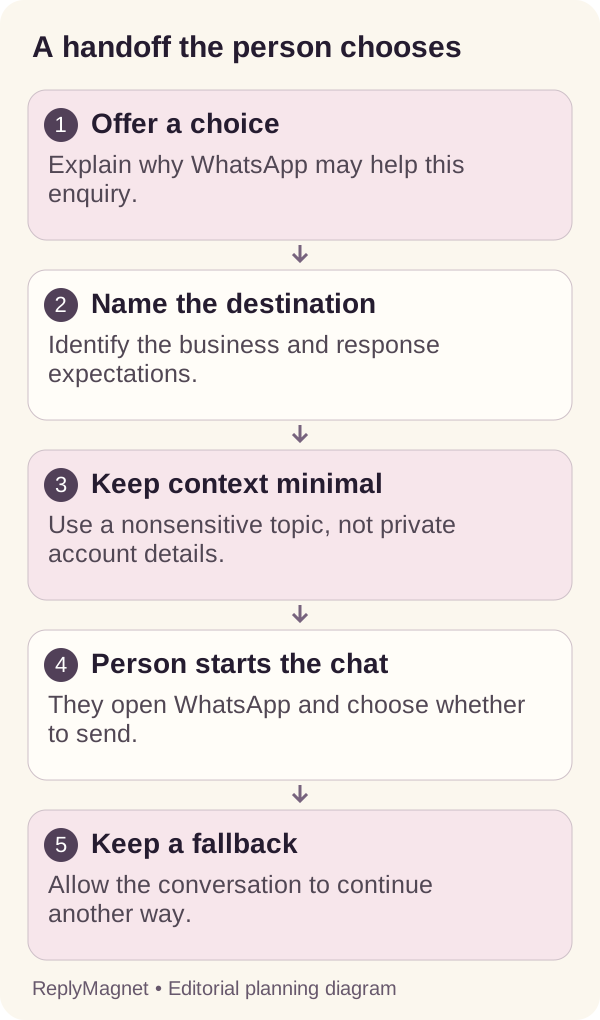
Handoff diagram: the customer chooses the channel; the business remains responsible for the next response.
Context checklist for the fictional repair enquiry
Information
Public resource or service name
- Include in a generic handoff?
- Yes, if relevant
Information
The next question
- Include in a generic handoff?
- Yes, in ordinary words
Information
Customer address or private account detail
- Include in a generic handoff?
- No
Information
Assumed identity match between apps
- Include in a generic handoff?
- No
Information
Expected response owner and hours
- Include in a generic handoff?
- Yes, if accurate
What can ReplyMagnet do in this journey?
ReplyMagnet can support the Instagram resource-request portion and an eligible external-link destination. This does not create WhatsApp automation, shared contact identity or synchronized conversation history.
For a standard ReplyMagnet resource campaign, external-link assets are available from Basic and above. Prepare and check the destination before placing it in a campaign. The asset documentation explains resource choices; the campaign reference covers the request configuration.
The important boundary is where the customer leaves Instagram. A link to WhatsApp is an external destination, not proof that ReplyMagnet can read the resulting messages, assign the WhatsApp conversation or verify a service booking there. Those responsibilities belong to the actual receiving setup and team.
Do not describe the handoff as automatic contact synchronization. If your business maintains records in another system, use its established process to associate a conversation with a customer only when the evidence and permissions support doing so. A matching display name is not enough for sensitive account work.
Keep the main offer intact. A resource campaign should still provide the promised resource. If the next step is optional support, label it that way. The human-handoff guide helps define when a person needs to take responsibility, regardless of which channel they use.
Test mobile, desktop and the fallback
Test the exact link a visitor receives on the devices your audience uses. Verify the business identity, suggested text and alternative route without relying on the owner’s already-signed-in session.
Ask a willing colleague to follow the route from the Instagram message. They should be able to identify the business before sending anything. Check that the prefilled message is readable and that punctuation or spaces have not damaged the link.
A desktop visitor may encounter WhatsApp Web or a sign-in step. A mobile visitor may not have the app installed or may not want to use it for business conversations. Provide a visible alternative that carries the same basic request, such as the shop's support page. Do not label the handoff broken solely because a person chooses the alternative.
Use a test record with four observations: link opened, correct business shown, visitor understood the next step, and receiving team could respond. A successful link opening alone does not establish the last two.
Check the actual copy after any phone-number change, staffing change or revised service hours. The link can keep working technically while pointing at a team that no longer handles that service. Review ownership along with the URL, especially when an employee leaves or a business changes locations.
Define who responds and what happens offline
Assign a team or person to the WhatsApp destination and state realistic availability. Moving a conversation is incomplete until someone owns the response or a clear fallback.
For the fictional shop, the workshop lead owns repair-slot questions during the day. Another employee checks whether any enquiry needs a reply before closing. That is an operating example, not a requirement to staff every channel continuously.
Write the public expectation in plain language. “Our workshop team replies during posted opening hours” is better than “Someone will be with you shortly” when the inbox may be unattended overnight. If the business offers a specific response target, measure it against actual arrivals and capacity. The response-standard guide provides a fuller planning method.
Decide what staff should do when the request is unsuitable for WhatsApp. A billing dispute may need an authenticated support route. A request involving confidential information may need a different process. The receiving employee should know how to explain that next step without asking the customer to repeat everything publicly.
Finally, ensure the Instagram side knows the handoff happened only when evidence exists. A link click or a generic invitation does not tell the original team that the person has received help. Keep unresolved enquiries visible in the process you actually use.
Review whether the switch made things easier
Measure the customer task after the handoff, not only how often the link was opened. Record incomplete and unknown outcomes instead of assuming every click became a useful conversation.
A small review can examine a few authorized examples: Did the person reach the right business? Did they have to explain the request again? Was the next response useful? Did they abandon the route because it required another app? These questions expose practical friction without needing an elaborate attribution system.
Keep separate counts for offered handoffs, observed link activity, received WhatsApp conversations and resolved service tasks where those records are available. Some people may open the link and decide not to send. Others may message later without the suggested text. Preserve those limitations when comparing totals.
If many people ask the same basic question after the switch, improve the initial information rather than adding another mandatory step. If people prefer staying on Instagram, make that path easier where your support capacity allows it.
The purpose is a clearer customer journey. A new channel is useful only when it improves the next decision or puts the request with the right owner. Keep the choice, test the destination and review the actual outcome before making it the default.
Common questions
Does clicking a WhatsApp link send the message automatically?
The link opens the destination and can prefill text. The person still chooses whether to send the message; do not count the click as a completed conversation.
Will ReplyMagnet copy the Instagram conversation into WhatsApp?
No such synchronization is established here. This guide describes an external link and a customer-controlled handoff, not a native WhatsApp integration.
Should I collect a phone number before offering the link?
Only collect information your process actually needs and explain why. A voluntary click-to-chat route can let the visitor start the conversation without first submitting a number to your Instagram campaign.
Keep reading
- Instagram DM conversation design: a practical guide
- Instagram DM Automation vs Email Marketing: When to Use Each
- Create a ReplyMagnet campaign: posts, triggers and delivery
- ReplyMagnet assets: upload a PDF or add a link