Compare
Is ReplyMagnet the right LinkToDM alternative for you?

Consider ReplyMagnet when you want to turn an Instagram resource request into a delivered PDF, an optional email signup and a clear next step. Compare the complete campaign you need to run, including the ongoing plan after a trial.
Published by ReplyMagnet · Last updated
Reviewed 19 October 2026. Published by ReplyMagnet; this is a sourced product comparison, not an independent hands-on ranking.
Already happy with your current setup? A switch should solve a specific problem. Use this page to evaluate campaign fit, the cost of the required features and the work needed to move safely. If you only want an ongoing free option, see free Instagram DM automation.
The short answer
ReplyMagnet is a useful LinkToDM alternative for focused resource-delivery and lead-capture campaigns. Test one real offer first: account limits, usage units, resource types and integrations matter more than a headline price.
Start freeStart with the job your automation must do
Choose an alternative by the customer journey you need to support: the request, the response, the resource and the next action.
A creator offering a meal-planning worksheet needs a different journey from a team managing many accounts. Write a one-sentence requirement before evaluating tools: “When someone comments PLAN on this Reel, send the worksheet, optionally collect an email and let me find the captured lead.”
ReplyMagnet supports that PDF-and-capture workflow. You choose the post, configure the trigger and message, attach the resource and decide whether the download page asks for an email. The campaign setup guide explains the controls. For requests beyond the exact keyword, AI Smart Triggers can help match eligible requests within a daily allowance. They do not turn every comment into a lead or guarantee a match.
If your offer requires a booking URL, an email-list handoff or several connected accounts, include those requirements now. Otherwise a free-plan test can look successful while the ongoing campaign needs a different plan.
Try the resource flow for 30 days with 1,000 engagements. No card required.
Start freeWhat to check in LinkToDM before switching
LinkToDM offers a free tier with multiple account slots and basic automation; compare it against the specific workflow you want to change.
The LinkToDM pricing page, checked 19 October 2026, lists 2,000 DMs, three creator accounts, two team seats, a basic flow builder and Story replies on Free. Its monthly comparison lists Pro at $15 and Pro+ at $25. The page uses both DM and contact labels and shows inconsistent upper-tier account counts; confirm those details with the vendor. AI feature access also needs checking for the exact plan.
Use your current account and the vendor’s current documentation to validate any requirement that decides the purchase. Existing flows, staff familiarity and the time needed to rebuild are part of switching cost. Keep a setup that already serves your important offers well unless the alternative provides a useful improvement.
Where ReplyMagnet fits a resource-led campaign
ReplyMagnet combines requested-resource delivery, optional email capture and plan-based lead handoffs in one campaign workflow.
Its always-free Starter plan includes one connected account, one live campaign, PDF hosting and email capture. A coach can use it for one downloadable checklist, while a course creator can share a sample-lesson PDF. People who request the resource receive the campaign’s configured experience, subject to eligibility and sending limits.
Basic adds external link assets, CSV export and Mailchimp or Kit sync. That can suit an offer hosted on your own site or a campaign where captured emails need to reach an existing list. Pro adds outbound webhooks for a supported external handoff and up to three connected accounts. Choose the smallest plan that covers the entire journey, rather than upgrading for a feature you will not use.
Email capture and asking for a follow are optional. Keep the offer clear: tell people what they receive and what action the campaign asks them to take. Test the resource on a phone, including the capture page, before sending visitors to it.
Compare ReplyMagnet plans against your requirements
Starter supports a single PDF campaign; Basic adds own-link delivery and native email sync, while Pro adds webhooks and more connected accounts.
All campaigns share the workspace allowance. For a keyword-comment campaign, processing one matching comment for its public reply and DM uses one engagement. Repeated requests can use further engagements; unique followers, saved leads and total messages are different measurements. Use plans and billing and your workspace usage to estimate the plan.
A request beyond the allowance may wait for capacity. It still needs an eligible account, campaign and messaging window, so queued work is not guaranteed to deliver later.
ReplyMagnet monthly plan facts checked against the current product catalogue on 19 October 2026.
Plan
Starter: $0
- Monthly allowance and accounts
- 1,000 engagements; 1 account; 1 live campaign
- Useful for
- A PDF offer with optional email capture
Plan
Basic: $9
- Monthly allowance and accounts
- 25,000 engagements; 1 account; unlimited live campaigns
- Useful for
- Own links, CSV export, Mailchimp or Kit sync
Plan
Pro: $29
- Monthly allowance and accounts
- 100,000 engagements; up to 3 accounts
- Useful for
- Webhooks and unbranded download pages
Keep the trial separate from the ongoing free plan
The 30-day no-card trial previews Pro features with a 1,000-engagement allowance; afterward Starter limits apply unless you choose a paid subscription.
Trial access is useful for testing a required integration or multi-account setup. It does not make those features part of the ongoing free plan. Record which features your pilot uses and select the intended post-trial plan before advertising the offer broadly.
For example, a PDF campaign on one account can fit Starter, but a booking-link asset needs Basic or higher after the trial. A webhook handoff needs Pro or higher. Check account eligibility and campaign state again after a plan change.
A practical switching checklist
Pilot one post and resource, verify the complete recipient experience, then move additional campaigns only after the first journey works.
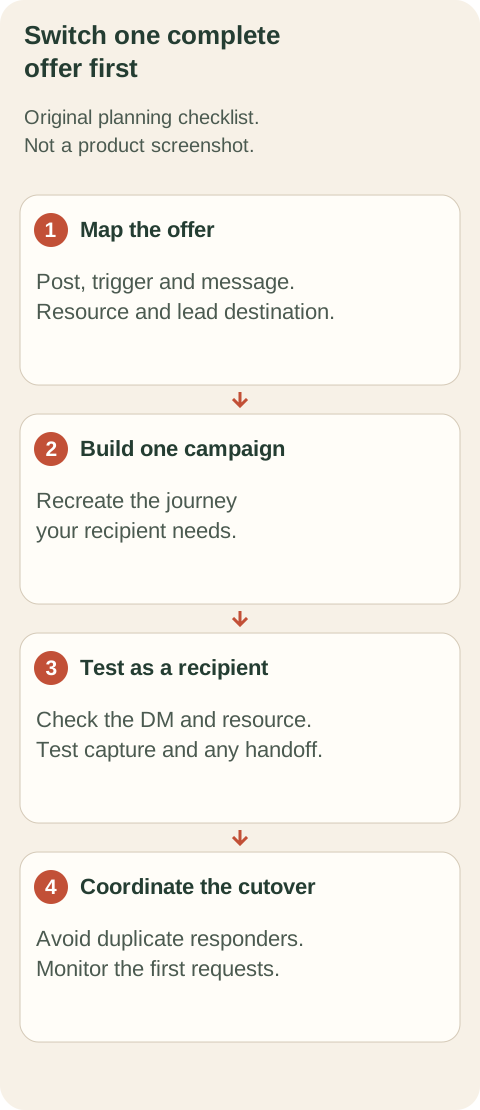
Original decision diagram. A successful pilot should cover the resource and lead destination as well as the DM.
- Map the existing offer. Record the post, keyword, message, asset, capture fields and any list destination. Save approved copy and the original file.
- Build one equivalent campaign. Connect the intended professional account through the official connection, add the resource and configure the trigger. Follow the comment-to-DM walkthrough.
- Test as a recipient. Use a separate account to make a controlled request. Open the DM, follow the resource link and complete the capture step if enabled. Check the lead and any configured handoff. Do not assume delivery of the first message proves the whole journey.
- Coordinate the cutover. Avoid two tools responding to the same live post and trigger. Pause the old automation for that offer as you activate the replacement, then monitor activity and usage. Keep the remaining offers unchanged until their turn.
If something fails, use the comment-to-DM troubleshooting guide to separate account, trigger, allowance and delivery issues. Change one part at a time so you can see what fixed it.
Make the decision from the pilot
Switch when the replacement supports your required journey and its ongoing plan makes sense for your usage and team.
Judge the pilot against the requirement you wrote at the start. Could a recipient get the correct resource? Was the capture experience clear? Could your team verify the result and maintain the campaign? Does the intended paid or free plan include every feature used?
This is a fit decision, not a promise that changing software will create demand. The post, offer and audience still determine whether people want the resource. Pick the tool that lets you deliver that offer clearly and maintain it confidently.
Sources: LinkToDM pricing, reviewed 19 October 2026; ReplyMagnet’s current plan catalogue and billing documentation. Prices are US-dollar monthly billing figures where stated; verify checkout before purchasing.
Common questions
Is LinkToDM the same product as LinkDM?
They are different products. This page evaluates LinkToDM at linktodm.com. For the other product, use our separate LinkDM comparison.
Can I use ReplyMagnet without paying after the trial?
Yes. Starter remains available with 1,000 monthly engagements, one connected account and one live campaign. PDF hosting and email capture are included; paid-feature limits apply after the trial.
Does moving tools copy my existing flows automatically?
Automatic migration is not promised here. Rebuild and test a representative campaign, including its resource and integrations, before moving more offers.