Guides
Find why your Instagram comment-to-DM is not working
If Instagram comment-to-DM is not working, first confirm the campaign is live and covers the correct post. Test its configured keyword from a different account, then inspect Delivery activity to find whether the request stopped at matching, sending or resource access. A public reply alone does not prove that the DM arrived.
Published by ReplyMagnet · Last updated
What should you check first when comment-to-DM stops working?
Confirm the account, live campaign and post, then leave one new keyword comment from another account. Follow that single request in Delivery activity before changing permissions, keywords or assets.
We built ReplyMagnet's activity view so every request shows where it stopped. Use it as your first stop, then fix only that stage. New here? Start free; comment automation is included on the free plan.
- Check the campaign. The connected account owns the post, and the campaign is live, not a draft or paused.
- Comment from another account. Use the configured keyword alone. The connected account's own comments are ignored.
- Open Delivery activity. Compare Campaign match, Public reply and DM for that comment. Keep its support reference.
- Fix the first missing step only. Use the sections below.
- Retest once. One new comment, one changed setting.
This page is the troubleshooting hub. Related problems have their own guides:
Where to go for related problems
Problem
Welcome message to a new DM not sending
- Guide
- [Instagram welcome message guide](/guides/instagram-dm-welcome-message)
Problem
Expired request, 24-hour window, permissions
- Guide
- [Instagram DM automation rules](/guides/instagram-dm-automation-rules)
Problem
Follow check not passing or not wanted
- Guide
- [Instagram follow gate rules](/guides/instagram-follow-gate-rules)
Problem
Setting up a campaign from scratch
- Guide
- [Comment-to-DM setup guide](/guides/instagram-comment-to-dm-automation)
Find the stage where comment-to-DM stopped
A request passes four stages: comment received, campaign matched, DM accepted by Instagram, resource opened. Investigate the first stage you cannot confirm, because a public reply does not prove the private message was sent.
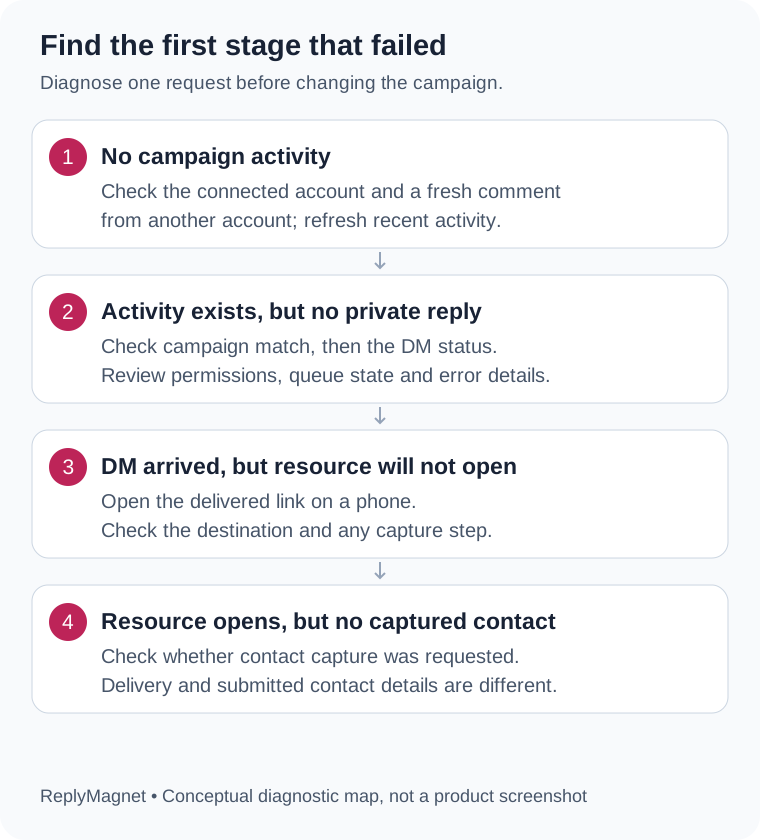
Original troubleshooting diagram: investigate the first unconfirmed stage, then test the next one.
Activity shows the latest 30 messages and comments across your accounts, with received times in UTC. Note the time of your test so you can find it.
Start with what you can observe
Observed symptom
No recent activity entry
- First check
- Account, new comment from another account, selected post
Observed symptom
No match recorded
- First check
- Live campaign, post scope, exact keyword
Observed symptom
Public reply sent, DM not recorded
- First check
- DM status and job detail
Observed symptom
Waiting for engagement quota
- First check
- Workspace allowance and queue
Observed symptom
DM marked Sent, recipient cannot find it
- First check
- Recipient's message requests
Observed symptom
DM found, resource unavailable
- First check
- Asset, link and capture step
No DM when commenting on Reels
Comment automation treats a Reel as an ordinary post. A missing DM on Reels usually means the campaign does not cover that Reel, the comment did not match, or the DM landed in message requests.
Most "no DM on Reels" reports come from one of these:
- The campaign is scoped to other posts. A campaign for specific posts covers only the posts you ticked. A new Reel is not added automatically. Add it, or choose All posts.
- A second campaign shares the Reel. When two live campaigns cover one Reel, check which campaign name appears in activity. A keyword match wins over a "comment anything" campaign.
- The comment did not match. Reel comments are often emoji or short phrases. Put one clear keyword in the caption, or use smart matching, and test with the keyword alone.
- The commenter checked the wrong inbox. If they do not follow the account, the DM usually arrives in message requests, not the main inbox.
- You commented on your own Reel. Comments from the connected account are ignored by design.
If you are the commenter and do not run the automation, check message requests first, then tell the creator publicly that the DM did not arrive.
What does "No match recorded" mean?
No match recorded means processing ended without matching a live campaign. Check that the campaign is live, covers that post and accepts the exact test keyword before suspecting the connection.
Check in this order: correct account, live status, post scope, then trigger.
How each match mode treats the keyword MENU
Mode
Contains
- Matches
- "send MENU please", "menu"
- Does not match
- "menus" or "menupdf" (whole words only)
Mode
Exact
- Matches
- "MENU", " menu "
- Does not match
- "send MENU please"
Mode
Smart (AI)
- Matches
- "can I get the menu?" when the intent is clear
- Does not match
- Vague praise such as "great post"
Smart matching runs only after a keyword miss, so test the plain keyword first to isolate the ordinary path. If the activity row is missing entirely, confirm the post belongs to the connected account and that the account is still connected. Disconnecting pauses associated campaigns, so reconnecting alone does not make delivery live again. The connection documentation covers account type errors; personal Instagram accounts cannot be connected. If you are choosing between the two professional types, see Business versus Creator for DM automation.
Public reply appeared, but no DM: queued, failed or expired
The public reply and the private message are separate steps. Read the DM status in activity: quota waiting, temporary retry, final failure and expiry each need a different action, and resubmitting fixes none of them.
Meta allows a private reply to a comment within 7 days of the comment, per its Instagram messaging documentation. ReplyMagnet checks the original comment time, so reconnecting does not make an old request eligible again. A public reply marked "Skipped: send could not be confirmed" means uncertainty, not absence: check the Instagram thread before replying by hand.
Read the status before choosing a recovery action
Activity detail
Processing now
- Next action
- Refresh and watch progress
Activity detail
Temporary failure with retry time
- Next action
- Wait for the scheduled retry; keep the reference
Activity detail
Waiting for engagement quota
- Next action
- Review the allowance in [plans and billing](/docs/plans-billing); the request is queued, not dropped
Activity detail
AI budget exhausted
- Next action
- Read the retry detail; test with an exact keyword meanwhile
Activity detail
Failed, no further retries
- Next action
- Contact support with the reference
Activity detail
Outside eligible reply window
- Next action
- Keep the record; test with a new comment
DM marked Sent, but the person cannot find it
Sent means Instagram accepted the message. Acceptance does not prove inbox placement, reading or a download, so ask the tester to check message requests on the account they commented from.
- Confirm which account commented. People switching between profiles often check the wrong inbox.
- Check message requests, including the Spam folder, not only the main list.
- Open Instagram directly rather than trusting a notification.
- Do not ask testers to loosen privacy settings to make a test pass.
Avoid sending a second DM just because no read receipt exists. Record what the person actually received first. The analytics documentation explains why delivery and resource opens are counted separately.
Reply to a specific message not working
When a reply to an automated DM does nothing, check three things. The recipient used the Instagram phone app, replied within 24 hours, and a live flow or DM campaign expects that reply.
- Buttons and quick replies need the phone app. Instagram's website does not render quick replies, so a tester on desktop has nothing to tap.
- The 24-hour window has closed. Business follow-ups must arrive within 24 hours of the person's latest message. A reply processed a day later can expire.
- Nothing is listening. A typed reply triggers automation only if a live DM keyword campaign or flow step expects it. Otherwise it waits in your inbox for a person.
- The original message is gone. If the earlier message was unsent or disappeared, swipe-to-reply on it can fail inside Instagram itself. Ask the person to send a new message.
- The app is out of date. On a personal phone, updating or restarting the Instagram app often fixes reply-to-message problems.
The DM automation rules guide explains the 24-hour window in full.
If the DM arrived, test the resource separately
Open the exact link in the received message on a phone and complete any capture step. A working DM can still point to a missing asset, an expired delivery link or a confusing form.
Use the link your tester received, not a URL copied from your file library. Check that the title and contents match the caption's promise. If an email or phone step appears, compare it with the campaign settings and the capture-gates documentation. A wrong or missing file is fixed in Assets; reconnecting Instagram will not repair it.
Run one controlled retest and keep the result
Change one identified setting, leave one new comment from another account, then record each stage. Compare the result with the original failure before making a second change.
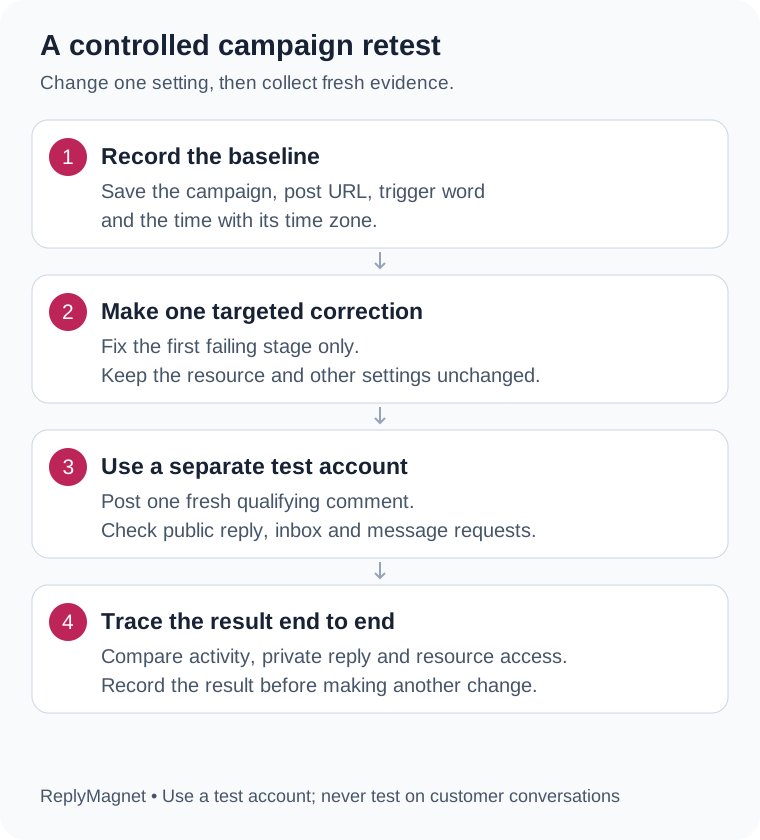
Original retest diagram: one changed setting makes the comparison readable.
Copy this worksheet into your notes:
- Post, comment, time and timezone:
- Account and campaign:
- Last confirmed stage:
- Setting changed and why:
- New comment and time:
- Match / public reply / DM status:
- Tester found message, opened correct resource (yes/no):
- Support reference and next action:
Example: a cafe's MENU campaign showed no match because the wrong Reel was selected. Change only the post selection and test MENU again. This is an illustrative example, not a customer case.
What should you send to support?
Send the expected result, the stage where the request stopped, the test time with timezone and the activity support reference, plus one sanitized example and the changes already tried.
A useful request: "Campaign [name], post [link]. A test account commented [keyword] at [time, timezone]. Expected a DM with [resource]. Activity shows [match], [public reply], [DM], [status], reference [ref]. We changed [one setting] and retested at [time]: [result]." Never include passwords or tokens. Keep the successful test record afterwards as a baseline for the next change.
Common questions
Why am I not getting a DM when I comment on Reels?
Comment-to-DM tools treat a Reel like any post, so the campaign must cover that Reel and your comment must match its keyword. If you do not follow the account, check message requests, because the DM usually lands there.
Why is reply to a specific message not working on Instagram?
Swipe-to-reply fails when the original message was unsent or disappeared, or when the app needs an update. Buttons in automated DMs need the Instagram phone app, and replies after 24 hours fall outside the business messaging window.
Can I test comment-to-DM using the connected Instagram account?
Use a different account. ReplyMagnet ignores the connected account's own comments, so a comment from that account does not test the customer path.
Does a public reply mean the DM was delivered?
No. Public replies and DMs are separate steps. A DM status of Sent means Instagram accepted the message, not that the recipient read it.
Should I delete and recreate a campaign when a DM is missing?
Start with the activity record and one controlled test. Recreating a campaign hides the original settings without fixing a permission, quota or resource problem.
Keep reading
- Guides
- Instagram Comment-to-DM Automation: Setup & Test Guide
- Instagram DM Automation Rules: 7-Day & 24-Hour Windows
- Instagram welcome messages: setup and test guide (2026)
- Instagram follow gate rules: what the check proves