Free plan
Free Instagram DM automation for your first resource campaign

You can automate a requested PDF from an Instagram comment without an ongoing paid subscription. ReplyMagnet’s Starter plan includes one account, one live campaign and 1,000 monthly engagements, with optional email capture.
Published by ReplyMagnet · Last updated
Plan facts reviewed 19 October 2026. Published by ReplyMagnet.
This page helps you decide whether a free workflow fits your offer and what to check before launch. For the full interface walkthrough, use how to set up comment-to-DM automation.
The short answer
Start with a single PDF offer and check that it fits the ongoing Starter plan. The 30-day trial previews extra features; own-link delivery, list sync and advanced chat flows have separate paid-plan requirements afterward.
Start freeWhat can you automate for free?
Starter supports a single PDF resource campaign with optional email capture, one connected account and 1,000 monthly engagements.
The simplest offer is specific: a workout worksheet, a sample course lesson or a practical checklist. Your caption tells people what to request, the campaign recognizes a matching comment and the configured reply and DM help them reach the resource. You can deliver the PDF directly or ask for an email on the download page.
Starter also includes AI Smart Triggers with a shared daily allowance of 100 checks. Keywords are checked first; eligible requests beyond the exact wording may use smart matching. This helps recognize how people ask for a resource, rather than inventing an answer or replacing the campaign you configured. Read how AI Smart Triggers work before relying on them.
Use the free plan for an offer you can maintain within these limits. One strong resource and a clear caption are a better starting point than several competing promises on the same post.
Try the resource flow for 30 days with 1,000 engagements. No card required.
Start freeFree plan and free trial: what is the difference?
Starter is the ongoing $0 plan. The 30-day trial temporarily previews Pro features with a smaller trial allowance, then Starter applies unless you subscribe.
A new workspace can show options during the trial that are not included in Starter afterward. That matters if you test an external booking link, a native email-list connection, a webhook or a multi-step chat flow. Check the intended plan before building your public offer around those features.
No card is required to start. Choosing a paid subscription is a separate action. Keep an eye on trial status and usage in the workspace rather than assuming the trial has the paid Pro plan’s full monthly capacity.
Choose the ongoing plan separately from trial access.
Requirement
Usage
- Ongoing Starter
- 1,000 engagements per month
- 30-day trial
- 1,000-engagement trial allowance
Requirement
Connected accounts
- Ongoing Starter
- 1
- 30-day trial
- Up to 3
Requirement
Live campaigns
- Ongoing Starter
- 1
- 30-day trial
- Pro feature access during the trial
Requirement
Resources and handoffs
- Ongoing Starter
- PDF hosting and email capture
- 30-day trial
- Paid features can be evaluated within trial limits
Requirement
After 30 days
- Ongoing Starter
- Remains available at $0
- 30-day trial
- Moves to Starter unless you choose a paid plan
Which offers fit the ongoing free plan?
Choose one downloadable PDF that solves a clear problem and can be delivered from one account through one campaign.
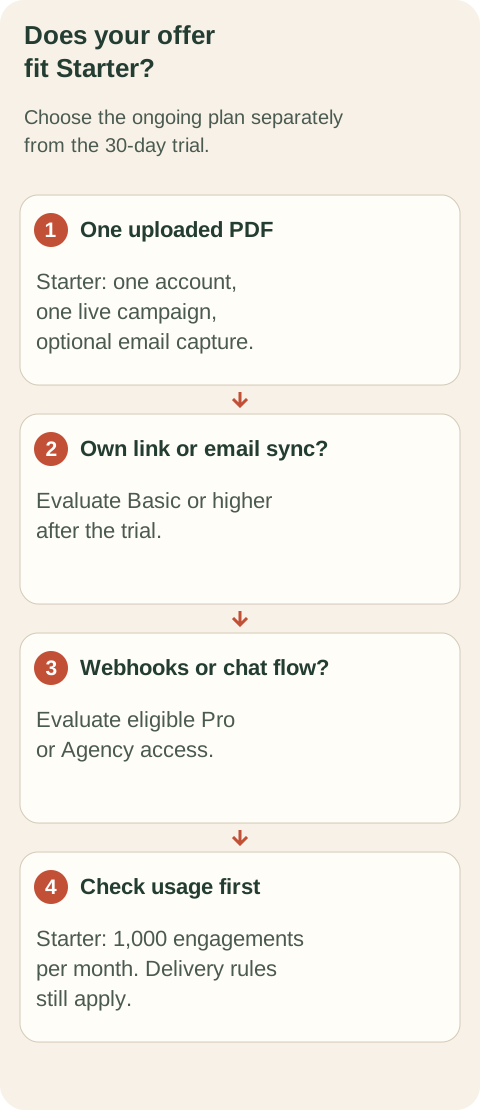
Original planning diagram. Pick the resource and required handoff before choosing a plan.
Here are three illustrative offers, not customer results:
- Fitness coach: a printable weekly workout tracker. Caption: “Comment TRACKER and I’ll send the PDF.” The download page can optionally collect an email.
- Course creator: a short lesson worksheet that helps someone complete one useful exercise. The PDF should stand on its own and explain the next step clearly.
- Photographer: a preparation checklist for a portrait session. Keep it useful even for someone who is not ready to book.
An external scheduling page or a hosted video URL uses a different resource type from an uploaded PDF. Own-link assets start on Basic. Likewise, automatic Mailchimp or Kit sync and CSV export need Basic or higher after the trial. If your real goal is a branching conversation rather than one resource delivery, review the chat flow builder guide and its plan requirements.
Set up a meaningful free campaign
Prepare the PDF, connect your professional account, configure one post and trigger, then test the complete recipient journey before promotion.
- Make the resource useful. Give the PDF one outcome, such as planning a week of workouts. Open it on a phone and check the text, links and final next step. A free tool cannot rescue a broken file or an unclear offer.
- Connect the right account. Use an Instagram Business or Creator account and the official connection flow. A personal account needs to become a professional account before connection. Follow connect Instagram.
- Create one campaign. Choose the intended post or Reel, use a memorable keyword such as TRACKER and write a short reply and DM that match the caption. Attach the uploaded PDF. The campaign setup instructions cover the controls.
- Choose the capture experience. Keep delivery direct if the resource is the whole goal. If you enable email capture, tell people what they are signing up for and keep the request relevant to the resource. Starter lets you view leads from the last 30 days in the app.
- Test before inviting the audience. Use a separate account to request the resource. Check the public response, DM, link, PDF and optional capture step. If another tool already handles that post, coordinate the change so two automations do not answer the same request.
- Monitor the first requests. Check campaign activity and workspace usage. Fix a repeated problem before promoting the offer more widely. Use the troubleshooting guide if a request does not reach the expected step.
Understand the allowance before a post takes off
For a keyword-comment campaign, one matching comment’s public reply and DM share one engagement; campaigns share the workspace allowance.
The allowance is not your follower count or the number of saved leads. Repeated matching requests can consume more engagements. Use campaign activity and workspace usage to understand actual consumption rather than trying to infer it from likes or reach.
When capacity is exhausted, requests may wait before sending. An upgrade or reset can create capacity, but an account, campaign or messaging-window restriction can still prevent delivery. Pending does not mean a message is guaranteed to arrive later.
Daily AI checks are a separate budget from monthly engagements. Starter allows 100 AI checks per day, shared by the workspace. Smart matching should complement a clear keyword and offer; do not advertise unlimited AI responses. The automation rules guide explains messaging boundaries.
When does a paid plan become useful?
Upgrade when the campaign needs a paid feature or more capacity: Basic adds own-link assets and email sync; Pro adds webhooks and more connected accounts.
Choose from the work the campaign must do. If your PDF offer fits Starter and usage stays within its allowance, a paid plan is not necessary merely to keep an ongoing free option. If the offer depends on sending a booking link or automatically routing captured addresses to a list, plan for that feature after the trial.
Check plans and billing for the current limits and effective plan changes. Multi-step chat flows require eligible Pro or Agency access, including valid trials; do not treat a successful trial flow as an ongoing Starter entitlement.
ReplyMagnet monthly options, checked against the current plan catalogue.
Need
One PDF offer with email capture
- Plan to evaluate
- Starter: $0; 1,000 monthly engagements
Need
Own links, CSV export or Mailchimp / Kit sync
- Plan to evaluate
- Basic: $9; 25,000 monthly engagements; 1 account
Need
Webhooks or up to 3 connected accounts
- Plan to evaluate
- Pro: $29; 100,000 monthly engagements
How to compare other free automation tools fairly
Compare the exact trigger, resource type, allowance unit, ongoing feature access and upgrade path for the campaign you intend to run.
A free label alone does not establish that a tool can run your offer. Ask whether the required trigger is included; how usage is counted; whether the resource and capture step are supported; and what remains after any trial. Check the number of accounts and live automations as well as the headline allowance.
Do not equate DMs, contacts and engagements. A larger number measured in a different unit is not automatically more usable capacity. Check current vendor documentation and a small practical test, then compare the cost of the whole workflow. For a specific evaluation, see the LinkToDM alternative comparison or the ManyChat alternative comparison.
Plan evidence: ReplyMagnet’s current billing catalogue, checked 19 October 2026, and plans and billing. Examples on this page are illustrative. Availability and delivery still depend on the connected account, campaign and platform rules.
Common questions
Is free Instagram DM automation a trial only?
ReplyMagnet offers both: a 30-day no-card trial and an ongoing $0 Starter plan. Starter has its own account, campaign, feature and monthly usage limits.
Can I send my own booking or product link on Starter?
Starter includes uploaded PDF hosting. Own-link assets are available on Basic and higher after the trial. Choose the resource type before deciding which ongoing plan fits.
Does free email capture include automatic list sync?
Starter includes email capture and in-app visibility for leads from the last 30 days. CSV export and native Mailchimp or Kit sync require Basic or higher after the trial.
Can a personal Instagram account connect?
You need an Instagram Business or Creator account. Switch a personal account to a professional account before using the official connection flow.