Guides
Instagram message expired: check the message, link or offer

"Message expired" on Instagram means the item in that chat can no longer be opened. There are three usual causes: a disappearing or view-once message closed, the story or post it pointed to was removed, or the sender unsent it or their account is no longer reachable from yours.
Published by ReplyMagnet · Last updated
Ordinary DMs do not expire on a timer, so start by working out which of the three you are looking at. You usually cannot get the original back, but the sender can send it again. If you are a creator whose automated DMs or links are showing as expired, skip to the 24-hour window section below.
What does message expired mean on Instagram?
On Instagram, "message expired" means a message or the content it points to can no longer be opened, usually because a disappearing message closed, a story or post was removed, or the sender unsent it.
Instagram does not publish one definition for the label, so match what you see to the table. Creators delivering resources by DM can start free and read the creator section further down.
What you see
A photo or video in the chat will not open
- Most likely cause
- Disappearing, view-once or Instants media that was already viewed or timed out
- What to do
- Ask the sender to send it again as a normal message
What you see
A reply to a story or post shows as unavailable
- Most likely cause
- The story passed its 24 hours or the post was deleted or archived
- What to do
- Ask the owner for the content or a link to where it lives now
What you see
A message you remember is gone or will not load
- Most likely cause
- The sender unsent it, or their account is deactivated, restricted or has blocked you
- What to do
- Message them again; if you cannot, the account is not reachable from yours
What you see
The DM opens, but its link says expired
- Most likely cause
- The link or offer expired, not the Instagram message
- What to do
- Contact whoever sent the link (see the last two sections)
Cause 1: a disappearing or view-once message closed
Instagram media sent in vanish mode, as view-once, or through Instants is designed to stop opening after it is seen or after a time limit, and Meta says Instants photos cannot be viewed after 24 hours.
Three Instagram features are built to disappear:
- Vanish mode. Messages in a vanish-mode chat disappear once they have been seen and you leave the chat. See Instagram's vanish mode help.
- View-once photos and videos. These open once (or twice when the sender allows a replay), then show as opened.
- Instants. Meta's May 2026 announcement says Instants photos disappear after viewing and cannot be viewed after 24 hours. Read Meta's Instants announcement.
None of these can be restored by you, the sender or a third-party app. Ignore any service offering to recover private messages in exchange for your login; that is a credential scam. If the content mattered, ask for it again in a normal chat.
Cause 2: the story, post or reel was removed
A reply to an Instagram story stays in your chat, but the story itself stops opening after 24 hours unless the owner saved it to a highlight, and a deleted or archived post or reel stops opening for everyone.
This is the most common reason a shared item shows as unavailable while the text around it is still readable:
- Stories last 24 hours. Your reply survives in the DM thread; the story it answered does not.
- Deleted or archived posts and reels disappear from every chat they were shared into.
- Private accounts. A post shared from a private account will not open for someone who does not follow that account.
The fix is a fresh share or a link to where the content lives now. The owner may also have removed it deliberately, so ask rather than assume a bug.
Cause 3: the message was unsent or the account is unavailable
An Instagram message disappears from your chat when the sender unsends it, and older messages can stop loading when the other account is deactivated, deleted, restricted or has blocked you.
- Unsent. Instagram lets a sender remove a message from both sides of the chat. Nothing is wrong with your account.
- Deactivated or deleted. The profile shows as unavailable and the conversation may stop loading.
- Blocked or restricted. You may still see the old thread but cannot reach the person.
The label alone does not prove you were blocked. A quick test: search for the profile from your account. If it shows and you can message it, the account is reachable and the expired item was one of the first two causes.
Message expired vs other Instagram message notices
"Message expired" is different from "message pending", an expired link and a messaging limit on your account, and each Instagram notice points to a different owner and a different fix.
People often search these together. They are not the same problem:
Notice
Message expired
- What it usually means
- The item in the chat can no longer be opened (the three causes above)
- Who can fix it
- The sender, by sending it again
Notice
Message pending or not delivered
- What it usually means
- The message has not gone through yet, often a weak connection or a message request the other person has not accepted
- Who can fix it
- You: check the connection, then wait for them to accept
Notice
This link has expired, request a new one
- What it usually means
- A login, reset or delivery link passed its time limit
- Who can fix it
- Whoever issued the link: request a fresh one
Notice
You can't send messages for a number of days
- What it usually means
- Instagram has temporarily limited your account's messaging, often after many messages in a short time
- Who can fix it
- Nobody can lift it early; follow the notice in the app
Only the first row is covered in depth here. For a limit on your own account, the notice inside the Instagram app is the authority, so follow its wording rather than a third-party fix.
What to do when an Instagram message has expired
When an Instagram message has expired, note the exact wording, identify which of the three causes fits, then ask the sender for a fresh copy, because expired media cannot be recovered by you or any app.
- Write down the exact notice and what you tapped just before it.
- Check the table at the top to match the cause.
- Update the Instagram app and reopen the chat once. A stale cache sometimes shows an item as unavailable.
- Ask the sender to resend it as a normal message or as a link.
- If it was a purchased file or course, contact the seller through your receipt, not through a new purchase.
- If none of this explains it, use the Instagram Help Center.
Do not post a private conversation publicly to get a diagnosis, and never hand your password to a recovery service.
For creators: the 24-hour window and expired automated DMs
Meta lets a business reply by DM within 24 hours of a person's last message and send one private reply to a comment within 7 days, so an automated DM queued past those windows expires instead of sending.
If you deliver resources by DM, "expired" usually means one of these windows closed, not that a customer's message vanished. ReplyMagnet follows the same clocks Meta enforces.
Window
Messaging window after a person DMs you or replies to your story
- Length
- 24 hours
- What expires
- Any automated DM not sent in time
Window
Private reply to a post or reel comment
- Length
- 7 days, one reply per comment
- What expires
- The comment-to-DM reply
Window
ReplyMagnet delivery link inside the DM
- Length
- 30 days from creation
- What expires
- The tracked link, not the file behind it
Window
Request waiting for monthly quota
- Length
- Until one of the windows above closes
- What expires
- The queued DM, marked expired
Over-limit requests wait in the overflow queue on every plan and send when capacity returns, but only while the window is open. A later upgrade does not rescue a request that already expired, so check each delivery's status. Review plan and quota behavior.
Published monthly plans are Starter $0, Basic $9, Pro $29 and Agency $79, with 1,000, 25,000, 100,000 and 400,000 engagements. The 30-day trial gives Pro features with 1,000 engagements and no card. The DM automation rules guide explains each window in more detail.
Worked example: when an automated Instagram DM expires
A comment left on an Instagram reel at 09:00 on 3 November can get its automated private reply until 09:00 on 10 November, while a story reply at 20:00 must be answered by 20:00 the next day.
Here is how the windows play out for one creator launching a free checklist with the keyword GUIDE:
- Monday 09:00. A follower comments GUIDE on the reel. The private reply can go out until 09:00 the following Monday.
- Monday 20:00. Another follower replies to the launch story. That DM must send by 20:00 on Tuesday.
- Monday 22:00. The account passes its monthly quota. New requests wait in the overflow queue instead of being dropped.
- Wednesday. The creator upgrades, which adds capacity and releases the queue within minutes. The comment requests still inside their 7 days send; the story reply from Monday has already expired.
The lesson: size the plan for launch-day volume, not an average week, and check expired deliveries the day after a spike. On Basic at $9 a month, 25,000 engagements cover most single launches with room to spare.
When the link or offer expired, not the message
An Instagram DM that opens but leads to an expired page is a link or offer problem for the sender to fix, and replacing a ReplyMagnet campaign asset changes future deliveries only, not links already sent.
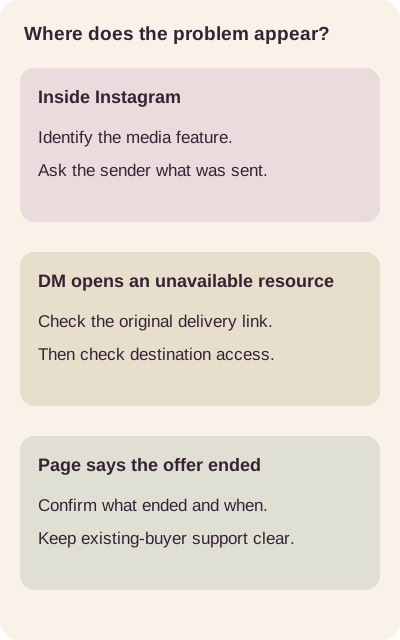
Original decision map. Follow where the problem appears before choosing an action.
For a dated sale, the Black Friday DM templates include a closing-hour checklist. As a creator, run three checks when a link or offer ends:
- Test the link a recipient actually received, from an account without owner access, not only the newest URL in your dashboard.
- Separate old and new deliveries. Previously delivered links stay tied to the original asset. The asset documentation covers this limit.
- Say what ended. Name the product, the action that closed, and the date with month spelled out and a time zone. Keep a support route for existing buyers on the closed page.
For ongoing upkeep, the resource delivery guide covers maintaining links after a campaign.
Sources
Platform and product facts on this page were checked on 23 October 2026 against Meta's own announcements, the Instagram Help Center and ReplyMagnet's documentation.
Common questions
What does message expired mean on Instagram?
On Instagram, "message expired" means the message or the content it links to can no longer be opened, usually a closed disappearing message, a removed story or post, or an unsent message.
Does message expired on Instagram mean someone blocked me?
Not on its own. An expired Instagram message is more often a closed disappearing message or a removed story; if you can still find and message the profile, the account has not blocked you.
Can you recover an expired message on Instagram?
No. Expired Instagram vanish-mode, view-once and Instants media cannot be restored by you, the sender or any app, so the only fix is asking the sender to send the content again.
Do normal Instagram DMs expire if they are not read?
Ordinary Instagram DMs do not expire on a timer; only vanish mode, view-once media, Instants and shared stories are designed to stop opening.
Why did my automated Instagram DM expire before sending?
An automated Instagram DM expires when Meta's 24-hour messaging window or 7-day comment reply window closes before it sends, for example while the request waits for monthly quota.
Will replacing my ReplyMagnet campaign PDF fix older delivery links?
No. ReplyMagnet keeps previously delivered links tied to their original asset, so test older links separately and tell earlier recipients about any correction.
Keep reading
- Instagram Comment-to-DM Not Working? Diagnose & Fix It
- Instagram DM Automation Rules: 7-Day & 24-Hour Windows
- Deliver an Instagram lead magnet without losing the reader