Guides
Instagram DM automation rules: what you can send and when

For a qualifying Instagram post or Reel comment, you can send one private reply within seven days. Further messages require the recipient to respond and must fit the 24-hour response window. Live comment replies must be sent during the broadcast. Below, each rule is set against what Meta documents and what users report.
Published by ReplyMagnet · Last updated
Instagram DM automation rules: the short version
Instagram DM automation is allowed through Meta's official Instagram DM API on Business and Creator accounts. The rules: one private reply per comment within 7 days, follow-ups only within 24 hours of the person replying, Live replies only during the broadcast.
ReplyMagnet is built on exactly these rules, so this page also describes how our campaigns behave. Start free: comment automation is on the free plan, and the 30-day Pro trial needs no card.

Editorial illustration of two separate messaging limits, not a product screen or a platform endorsement.
The rules at a glance
Rule
Private reply to a post or Reel comment
- Limit
- 1 message, within 7 days of the comment
- Source
- Meta private replies docs
Rule
Follow-up messages
- Limit
- Only after the person responds, within 24 hours of that response
- Source
- Meta private replies docs
Rule
Instagram Live comment
- Limit
- During the broadcast only
- Source
- Meta private replies docs
Rule
Account type
- Limit
- Business or Creator; personal profiles cannot connect
- Source
- Meta Messaging API docs
Rule
Non-followers
- Limit
- New conversations land in the Requests folder
- Source
- Meta Messaging API docs
Instagram DM limits: what Meta documents vs what users report
Meta's developer docs fix the reply limits, the permissions and the inbox folder a new DM lands in; most daily DM caps and ban thresholds quoted online are user reports that the developer docs we checked on 23 October 2026 do not state.
Most contradictory advice about Instagram DM limits comes from mixing the two columns below. Plan around the documented column. Treat the reported column as symptoms to investigate, not as rules.
Topic
Comment replies
- What Meta documents
- One private reply per comment, within 7 days
- What users report
- "The bot replied twice", usually two overlapping campaigns
Topic
Follow-ups
- What Meta documents
- Only after the person responds, within 24 hours
- What users report
- Reminder DMs days later with no reply, which the docs do not allow
Topic
Daily DM cap
- What Meta documents
- No fixed daily number for API private replies found in the docs we checked
- What users report
- Daily caps quoted in posts that disagree with each other
Topic
Where the DM lands
- What Meta documents
- New conversations from non-followers go to Requests
- What users report
- "My DM never arrived", often sitting in Requests
Topic
Restrictions
- What Meta documents
- Content must follow the spam standard
- What users report
- Blocks after password-sharing tools or unofficial scripts
Sources: Meta private replies, Meta Messaging API and Meta's spam standard. If a number is not on a Meta page, we do not build campaign logic on it.
How many DMs can you send on Instagram a day?
Meta publishes no daily number of DMs for automated private replies; its Messaging API page, checked on 23 October 2026, states no daily or hourly cap. The limits it does set are per person: one reply per comment within 7 days, and follow-ups only within 24 hours of a reply.
Searches for an Instagram DM limit per day usually find a number, such as 50 or 100 a day, quoted in a blog post or a forum thread. None of those figures appears on the Meta pages we checked, and they disagree with each other, so we treat them as user reports.
What does hold, per Meta's Messaging API page and private replies page:
- Per comment: one private reply, sent within 7 days of the comment.
- Per conversation: further messages only within the 24-hour window after the person writes back.
- Per message: text of 1,000 bytes or less, and up to 10 attachments in one request.
So the practical limit on automated DMs is how many people ask, not a daily quota. Sending only to people who commented or messaged first keeps an account inside both Meta's rules and its spam standard. Manual DMs from the Instagram app are a separate case: Instagram does not publish a number for those either.
The Instagram DM API: which endpoints send the message
The Instagram DM API is Meta's Messaging API for professional accounts. A private reply is a POST to the account's /messages endpoint with the comment ID as recipient; later messages use the person's Instagram-scoped ID.
Three pieces do the work in any official comment-to-DM tool, ours included:
- Webhooks tell the app a comment, message or button tap arrived (the
comments,messagesandmessaging_postbacksfields). - The private reply answers one comment privately. Meta's docs say it can go to a commenter on a post, Reel or story.
- The Send API continues a conversation the person has opened, inside the messaging window.
There is no endpoint for messaging someone who has not interacted with the account. A follower list or a list of usernames does not open a conversation. The Instagram Graph API entry covers the wider platform, and our Instagram automation guide covers what else it can and cannot automate.
instagram_business_manage_messages and the permissions behind it
Comment-to-DM on Instagram Login uses three permissions: instagram_business_basic to read the account, instagram_business_manage_comments to receive comments and send the private reply, and instagram_business_manage_messages for the conversation that follows.
Meta lists only the first two as requirements for the private reply endpoint. The third lets a tool read and answer the replies, button taps and story replies that come after it. A tool asking for all three is not overreaching; one asking for publishing or ads permissions to run comment-to-DM should explain why.
Permission
instagram_business_basic
- What it allows
- Read the professional account and its posts
- Needed for
- Connecting and picking posts
Permission
instagram_business_manage_comments
- What it allows
- Receive comments, send public and private replies
- Needed for
- The first DM after a comment
Permission
instagram_business_manage_messages
- What it allows
- Receive and send messages in conversations
- Needed for
- Follow-ups, buttons, story replies, DM keywords
Each permission must pass Meta App Review before a tool can use it for accounts it does not own. ReplyMagnet's app was approved for all three in August 2026. Approval covers the integration, not your campaign wording. You also need a Business or Creator account; a personal profile cannot connect.
The 7-day comment reply window
The 7-day comment reply window runs from the moment the comment was posted, not from when the post went live. Meta allows exactly one private reply to that commenter inside it.
An older Reel can receive a new comment; that comment gets its own 7 days. A worked example: a comment arrives Monday at 10:00. The private reply must go out before the following Monday at 10:00. If the person answers the DM on Wednesday at 15:00, follow-ups are allowed until Thursday at 15:00. Use one timezone throughout.
If they never answer, the 7 days do not give you 7 days of reminders. Opening a link or filling in a web form is not a DM response.
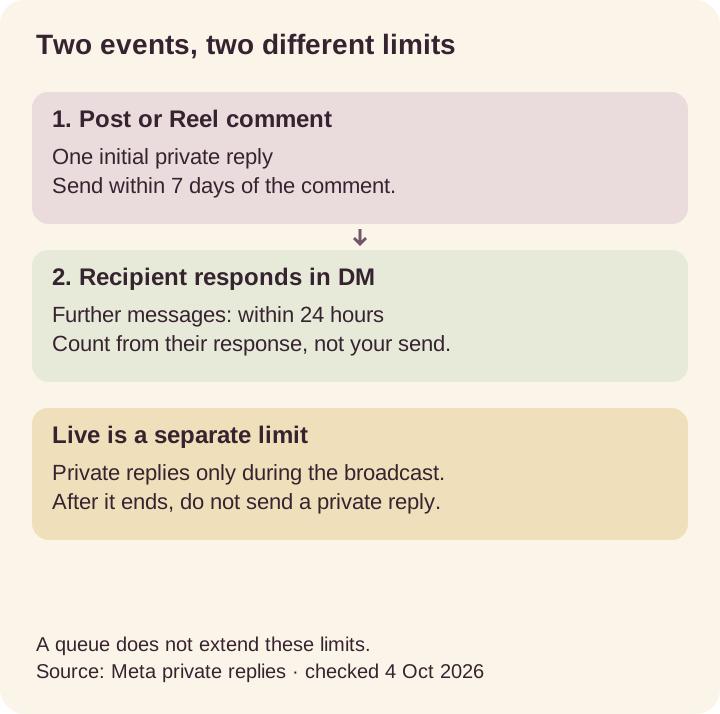
Rule diagram based on Meta's private reply limitations, checked 23 October 2026.
Which event permits which message?
Event
Post or Reel comment
- Allowed action
- One initial private reply
- Limit
- Within 7 days of the comment
Event
Recipient responds in DM
- Allowed action
- Continue the conversation
- Limit
- Within 24 hours of their response
Event
Instagram Live comment
- Allowed action
- Private reply during the broadcast
- Limit
- None after the broadcast ends
The 24-hour window: follow-ups, story replies and DM keywords
Meta's standard messaging window lasts 24 hours from the person's own action, such as replying to your DM, replying to your story or messaging you first, and messages you send inside the window do not restart the clock.
The 24-hour messaging window covers every conversation the person starts:
- Story replies arrive as messages, so the reply goes in the same thread within 24 hours. There is no public reply.
- DM keyword triggers (someone messages you GUIDE) answer inside the window that message opened.
- Click-to-Direct ads are the documented exception: the window may last up to 7 days from the first message.
- The Human Agent tag gives 7 days for replies written by a person. Meta frames it for human support, so ReplyMagnet does not request it for automation.
ReplyMagnet records the original event time and checks it again just before every send. A message processed after its window closed is marked expired, not sent late. Source: Meta Messaging API.
Keyword triggers: what counts as a match
ReplyMagnet keyword triggers match a whole word in any letter case, so "need the GUIDE pls" fires GUIDE while GUIDES does not. Exact mode fires only when the whole comment is the keyword.
Meta does not define keyword triggers; each tool sets its own matching. Ours, so you can predict what fires:
Mode
Contains (default)
- Fires on
- "send the GUIDE please"
- Does not fire on
- "GUIDES", "guidebook"
Mode
Exact
- Fires on
- "guide" on its own
- Does not fire on
- "guide please"
Mode
Smart (AI)
- Fires on
- "how do I get the hooks?" with no keyword, at 0.8 confidence or higher
- Does not fire on
- "great post!"
Mode
Any comment
- Fires on
- Every comment on the selected posts
- Does not fire on
- Your own comments
A keyword campaign always beats an any-comment campaign on the same post. Comments from the connected account itself never trigger anything, so test from a second account. For words that work, see trigger keyword ideas.
is_user_follow_business: what a follow check can verify
is_user_follow_business is a true-or-false field in Meta's User Profile API that says whether a person follows your account. Meta returns it only after that person messages you, taps an icebreaker or uses a persistent menu.
A comment alone does not grant that consent, so no official tool can check a commenter's follow status at the moment they comment. Source: Meta User Profile API.
How ReplyMagnet's optional follow gate uses it:
- The first DM asks the person to follow and tap a button.
- The tap opens the conversation, so the follow status can be read from Meta.
- The resource is sent only when Meta returns true.
The check is on every plan and off by default. Meta's spam standard warns against requiring follows to access content, so we recommend leaving it off for a plain resource request. The follow gate rules guide covers when it is reasonable.
A queue cannot extend a platform deadline
Requests waiting for ReplyMagnet quota keep ageing, so more capacity can release an eligible request but cannot make an expired message sendable.
The overflow queue is on every plan and holds over-limit requests instead of dropping them. When capacity returns, each one is re-checked against its original window. A flat plan makes this rare: $29 a month covers 100,000 engagements, where per-contact pricing bills every new person. See what ManyChat really costs per month for the per-contact version of the same numbers.
Investigate before retrying
Possible cause
Connection or permissions
- Useful check
- Confirm the account and resolve the connection error
Possible cause
Quota
- Useful check
- Review waiting activity and available capacity
Possible cause
Expired eligibility
- Useful check
- Compare the original event time with the window
Possible cause
Platform rejection
- Useful check
- Read the recorded error and whether it is retryable
For a missing DM, the delivery troubleshooting guide separates a matching problem from a send failure.
Check these rules before you launch
Before launching, match the caption, private reply and destination, confirm a Business or Creator account owns the post, and test from a second account while checking both Inbox and Requests.
- The keyword requests a named resource, and the DM delivers that resource.
- The connected professional account owns the selected post.
- The test comment comes from a different account.
- The tester checks Requests if they do not follow you (where message requests hide).
- Any email or phone ask is visible before submission.
- Follow-ups are planned only after a reply, inside 24 hours.
- Someone checks waiting, failed and expired activity weekly.
Then set up your first campaign, or follow the comment-to-DM setup guide step by step.
Common questions
What is instagram_business_manage_messages?
instagram_business_manage_messages is the Instagram Login permission for conversations. It lets an approved app receive and send messages a person started with a professional account, such as replies, button taps and story replies.
How many private replies can one Instagram comment receive?
Meta allows one private reply per comment, sent within 7 days of the comment. Further messages need the person to respond and must go out within 24 hours of that response.
Is there a daily DM limit for Instagram automation?
Meta's developer docs, checked on 23 October 2026, publish no fixed daily cap for API private replies. The documented limits are one reply per comment and the 24-hour window; daily figures online are user reports.
Why did my automated Instagram DM land in Requests?
Meta documents that new conversations from non-followers appear in the Requests folder. An automated DM to someone who does not follow the account lands there, not in Primary.
Can I privately reply to an Instagram Live comment after the broadcast?
No. Meta permits private replies to Instagram Live comments only while the broadcast is running, so a reply queued after the Live ends cannot be sent.
Can a tool check whether a commenter follows me?
Only after the commenter messages the account or taps a button: Meta's User Profile API returns is_user_follow_business once that consent exists, not from a comment alone.
Keep reading
- Guides
- Instagram Comment-to-DM Automation: Setup & Test Guide
- Instagram Comment-to-DM Not Working? Diagnose & Fix It
- Instagram follow gate rules: what the check proves
- Instagram welcome messages: setup and test guide (2026)
- Connect Instagram to ReplyMagnet: fix connection errors