Guide
Instagram automation: what you can safely automate, and how
Instagram automation means software doing a repeat task on your account: publishing, replying, moderating or reporting. Through Meta's official API it is allowed. Bots that follow, like or message strangers from your login break Meta's spam rules.
Published by ReplyMagnet · Last updated
What is Instagram automation?
Instagram automation is software doing a repeat task on an Instagram account, such as publishing posts or answering comments. ReplyMagnet automates one job through Meta's official API: replying to comments that ask for something and sending the requested link by DM.
There are two kinds, and the difference decides whether your account stays safe:
- Official automation runs through Meta's Instagram Graph API on a Business or Creator account, after the tool passes Meta App Review. It can only act where Meta allows.
- Unofficial automation imitates a person: bots that follow, like, comment or send DMs from your login. Meta's API overview lists no action for following or liking other accounts.
Should you use ReplyMagnet for it? Yes, if your posts or Reels invite people to comment a word to get a guide, a link or a discount code. No, if you want a posting schedule or analytics: a scheduler does that job. Start free: comment automation is on the free plan, with 1,000 engagements a month.
What the official Instagram API can automate
Meta's Instagram API lets an approved tool publish posts and Reels, moderate comments, answer messages inside the messaging window, and read insights. It works for professional accounts only, per Meta's API overview checked 24 October 2026.
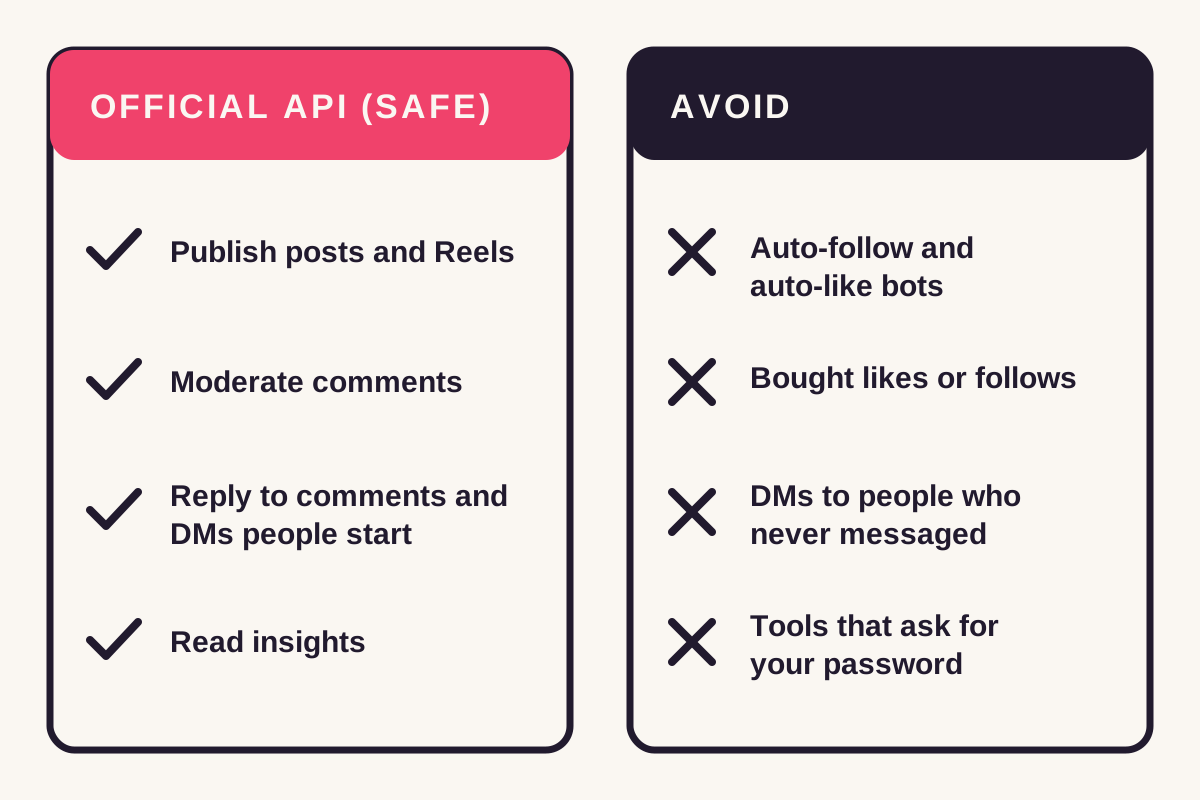
Everything in the left column has an official endpoint. Nothing in the right column does, which is why tools offering it need your password or a browser script.
What Meta's API covers
Task
Publish images, videos, Reels and carousels
- Through the official API?
- Yes
- Meta's limit or note
- A per-account cap on API-published posts in a rolling 24 hours; no shopping tags or filters
Task
Hide, delete or reply to comments on your own media
- Through the official API?
- Yes
- Meta's limit or note
- Your own posts only
Task
Private reply to a comment
- Through the official API?
- Yes
- Meta's limit or note
- 1 DM per comment, within 7 days of the comment
Task
Reply to DMs a person starts
- Through the official API?
- Yes
- Meta's limit or note
- Inside the 24-hour messaging window
Task
Insights and mentions
- Through the official API?
- Yes
- Meta's limit or note
- Read-only reporting
Task
Follow, unfollow or like other accounts
- Through the official API?
- Not listed
- Meta's limit or note
- No such action in Meta's API overview
Task
Message someone who never interacted with you
- Through the official API?
- No
- Meta's limit or note
- No endpoint opens that conversation
Sources: Meta's Instagram Platform overview, content publishing and private replies, checked 24 October 2026. Our DM automation rules guide covers the messaging limits in detail.
What not to automate on Instagram
Do not automate following, liking, bought engagement or messages to strangers. Meta's spam standard bans buying or exchanging likes, views and follows, and acting at very high frequencies, manually or automatically.
These are the patterns that get accounts restricted, and none of them runs through Meta's API:
- Follow and unfollow bots. There is no follow action in the official API, so the tool drives your login directly.
- Auto-likes and auto-comments on other accounts. Same problem: no endpoint, so it imitates you.
- Bought or swapped likes and follows. Banned outright by Meta's spam standard.
- Cold DMs. Messages to people who never commented or wrote to you have no endpoint. A tool sending them is working from your login.
- Tools that ask for your Instagram password. Official tools connect through Instagram's own login screen and never see your password.
If a tool sells "automated engagement", ask which API call it uses. If there is no answer, keep it away from your account.
Instagram's built-in automation, free
Instagram and Meta Business Suite include free automation, per Meta's help center. You get saved replies, an instant reply, an away message, FAQ prompts, and a DM for comments with your keywords.
Check these before paying for anything. The Business Suite automations need the Instagram account linked to a Facebook Page, and menus change between app versions. Meta documents saved replies in its professional inbox help and the Business Suite automations in its inbox automations guide.
Built-in option
Saved replies
- Sends on its own?
- No: you insert the text, then press send
- Good for
- Answers you repeat but still want to read first
Built-in option
Instant reply
- Sends on its own?
- Yes, to the first message of a new conversation
- Good for
- Confirming a message arrived
Built-in option
Away message
- Sends on its own?
- Yes, outside the hours you set
- Good for
- Setting expectations at night
Built-in option
Comment to message
- Sends on its own?
- Yes, a DM to comments with your keywords
- Good for
- A simple keyword-to-DM reply
Built-in option
Frequently asked questions
- Sends on its own?
- Shows tappable questions when a chat opens
- Good for
- Steering new chats to common topics
A comment tool earns its place when you want more around that DM. Think a public reply under the comment, an email captured before the file, matching for missed keywords, and lead records. Our Instagram auto responder guide compares the options side by side.
How to automate Instagram safely: 5 steps
To automate Instagram safely, switch to a professional account, pick one repeat job and try Instagram's free tools first. Connect any other tool through Instagram's own login, and test from a second account.
- Switch to a professional account. Use a Business or Creator account. Personal profiles cannot connect to Meta's API.
- Name the one job. Pick one repeat task: publishing, inbox replies, comment requests or reporting. One tool per job stops two automations answering the same person.
- Try the built-in option first. If Instagram's instant reply or Business Suite's comment to message covers the job, stop there.
- Connect through Instagram's own login. Check the tool lists the permissions it asks for and has passed Meta App Review. Never type your Instagram password into a third-party site.
- Test from a second account. Comment or message from a different profile, check the result, then go live.
ReplyMagnet ignores comments from the connected account itself, so a test from your own profile shows nothing. Use a friend's account or a spare one. The comment-to-DM setup guide walks through a first campaign screen by screen.
A worked example: one Reel, one keyword
A Reel that draws 400 GUIDE comments in a month uses 400 engagements in ReplyMagnet, one per comment. That sits well inside the free plan's 1,000 a month.
Here is the month in numbers, for a creator offering a free checklist:
- Comments with the keyword: 400.
- What each one gets: a public reply under the comment, then a DM with the checklist link.
- Engagements used: 400 of 1,000 on the free plan.
- If the Reel takes off: at 1,000 the plan is full, and further comments wait in the overflow queue instead of failing. Paid plans start at $9 a month for 25,000.
Meta's rule applies to every one of those DMs: one private reply per comment, sent within 7 days of the comment. Comments older than that are past the window. Pricing is per engagement, not per stored contact, so a busy month does not raise the bill on its own. The per-contact pricing entry explains the difference.
How to choose an Instagram automation tool
Choose an Instagram automation tool that connects through Instagram's own login and has passed Meta App Review. It should also do one job you can name, at a price you can predict.
Run any tool through this checklist before connecting it:
- Login: it sends you to Instagram's own screen. Fail if it asks for your password.
- Review: it says which Meta permissions it uses and that they passed App Review. ReplyMagnet's were approved in August 2026.
- Job: it does the one task you named in step 2, not "grow your account".
- Limits: it states Meta's 7-day and 24-hour windows instead of promising unlimited DMs.
- Price: you can work out next month's bill from your comment volume.
Use a scheduler for publishing, Business Suite for simple inbox replies, and ReplyMagnet when comments are requests for something you give away. Our compare hub sets ReplyMagnet against the main comment-to-DM tools.
Where Instagram automation goes wrong
Instagram automation usually goes wrong in four places. Two tools answer the same comment, DMs sit unseen in Requests, people misspell the keyword, or old posts keep sending dead links.
Fixes for each, in order:
- Two tools, one comment. Turn off Business Suite's comment to message on any post a third-party tool covers.
- Requests folder. DMs to people who do not follow you land in message requests. Say "check your DM requests" in the public reply.
- Misspelled keywords. Pick a short, plain word, or let AI matching catch "send it pls".
- Stale campaigns. Check old posts monthly and replace any link that no longer works.
If comments arrive and nothing sends, our comment-to-DM troubleshooting guide lists the usual causes.
Common questions
Is Instagram automation allowed?
Instagram automation through Meta's official API is allowed for Business and Creator accounts, within Meta's messaging windows. Follow bots, like bots and bought engagement break Meta's spam standard.
Can Instagram automation get my account banned?
Tools that follow, like or DM strangers from your login risk restrictions under Meta's spam standard. Tools on the official API act only where Meta has an endpoint and a reviewed permission.
Is there free Instagram automation?
Yes. Instagram's saved replies and Meta Business Suite's instant reply, away message and comment to message are free, and ReplyMagnet's free plan includes 1,000 comment engagements a month.
Can Instagram automation message people who never contacted me?
No. Meta's API has no endpoint for a first message to someone who never interacted with you. Instagram automation answers people who comment, reply to a story or message you first.
What is the best Instagram automation for comments?
For comments that ask for a resource, ReplyMagnet sends a public reply and a DM with the link through Meta's official API. The free plan includes 1,000 engagements a month.
Keep reading
- Instagram Comment-to-DM Automation: Setup & Test Guide
- Instagram auto responder: set up auto replies (2026)
- Instagram DM Automation Rules: 7-Day & 24-Hour Windows
- Compare